> ## Documentation Index
> Fetch the complete documentation index at: https://help.latchel.com/llms.txt
> Use this file to discover all available pages before exploring further.
# How To Specify If Your Service Provider Handles Emergencies, Non-Emergencies, Or Both
> This guide will show you how to indicate whether a service provider handles emergency work orders, non-emergency work orders, or both. Setting this correctly ensures that work is routed to the right provider based on the type of issue, helping avoid delays and miscommunication.
Click on **People** from the top navigation menu and select **Service Providers**.
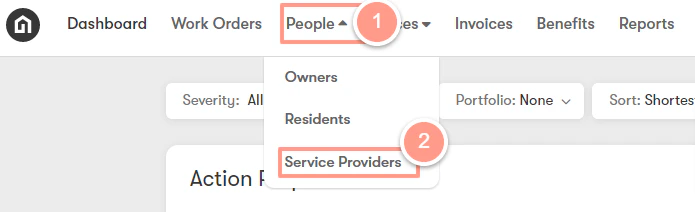 From the **Categories & Prioritization** page, you will see a list of skills, and for you to view the list of prioritized service providers just click the **arrow dropdown** of the corresponding skill on the far right side of the page.
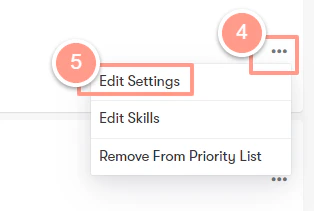
 Then click on the ellipsis next to the service provider and then on **Edit Settings**.
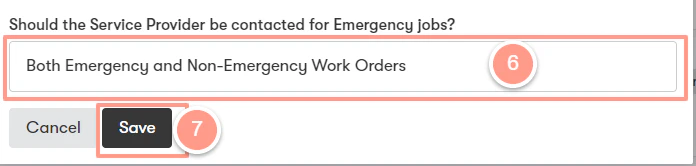
 Select your preference from the list nested under the text, ***“Should the vendor be contacted for Emergency jobs?“***. From here, you can modify if the service provider should be contacted for Emergency jobs, Non-emergency jobs, or both. Then **Save.**
 Please note that this setting is modifiable for the service provider and each trade (skill category) they are assigned. That means if you have a service provider that is prioritized for Appliance jobs and HVAC jobs, you will need to modify the job severity setting for the service provider under the Appliance skill category ***AND*** the HVAC skill category. ***This setting does not carry over to additional skill categories the service provider might be assigned to.***