> ## Documentation Index
> Fetch the complete documentation index at: https://help.latchel.com/llms.txt
> Use this file to discover all available pages before exploring further.
# How to Add Emergency Temperature Thresholds
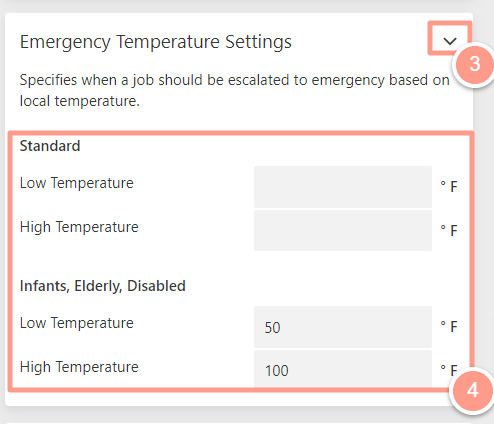
> This guide explains how to set emergency temperature thresholds in your Latchel account. These thresholds help ensure that temperature-related issues—like heating or cooling failures—are treated as emergencies when conditions fall outside of safe limits for residents.
### **4 Temperature Settings**
**A. Standard** **Settings** *(Healthy Individuals)*
1. Low Temperature
* This is the lowest temperature before you consider heating issues an emergency **(Latchel Default: 45°F)**
2. High Temperature
* The highest temperature before you consider air conditioning issues an emergency **(Latchel Default: 95°F)**
**B. Infants, Elderly, Disabled Settings**
1. Low Temperature
* This is the lowest temperature before you consider heating issues an emergency **(Latchel Default: 55°F)**
2. High Temperature
* The highest temperature before you consider air conditioning issues an emergency **(Latchel Default: 85°F)**
The local temperature shows up on the job page in Latchel. If there is a day in the week that will meet an emergency threshold, we show the thresholds and highlight the day in the red.
### **Updating Your Temperature Thresholds**
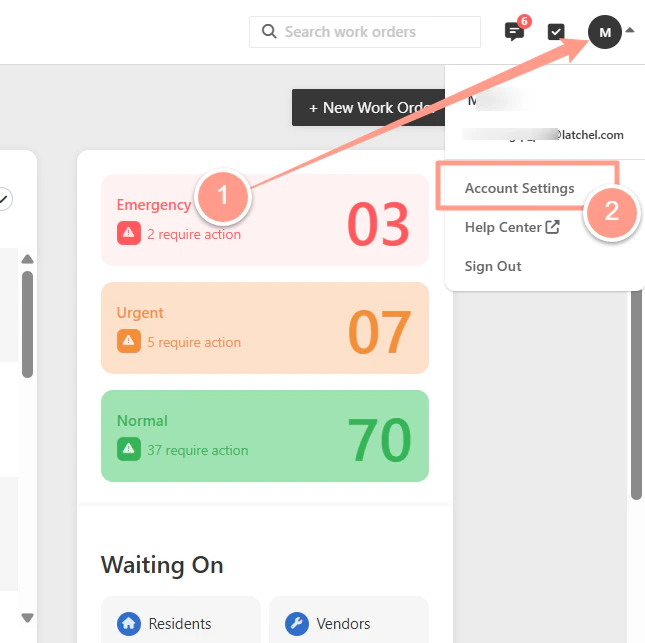
Click on your initials or profile picture in the upper right-hand corner of the dashboard, and select **Account Settings**.
 On the far lefthand side of the portal, expand the modal titled **Emergency Temperature Settings**. From here, you can modify/add the temperatures.