> ## Documentation Index
> Fetch the complete documentation index at: https://help.latchel.com/llms.txt
> Use this file to discover all available pages before exploring further.
# How to Add or Update Service Provider Instructions on a Work Order
> This field updates in real-time so the Service Provider will see this information the next time they view the job details.
The service provider will **NOT** be notified of any changes made to the scope of a request. Here's how you can add/update service provider instructions on a work order:
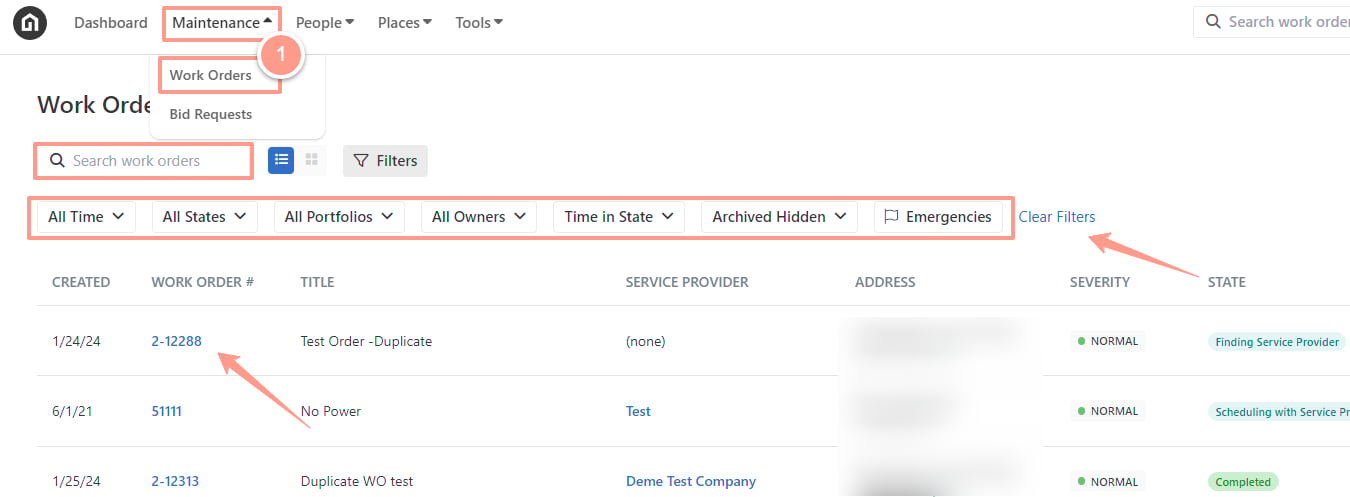
From the dashboard, click on the **Maintenance tab**, and open the work order by either **searching and/or clicking the specific order number**. You can also use the **Filter** and **Clear Filters** option for a more refined search. To learn more about how to use the Filter, check out this help guide: [****How to Use the Filter Options in the Work Order Tab Page.****](/s/topic/0TO5e000000h9wqGAA/How-to-Use-the-Filter-Options-in-the-Work-Order-Tab-Page)
 Either in the **Quick View** or in the **Details** tab, you will find the Service Provider section where you can find the **Service Provider Instructions** box. Write the new instructions you have for the service provider, then click **Save.**
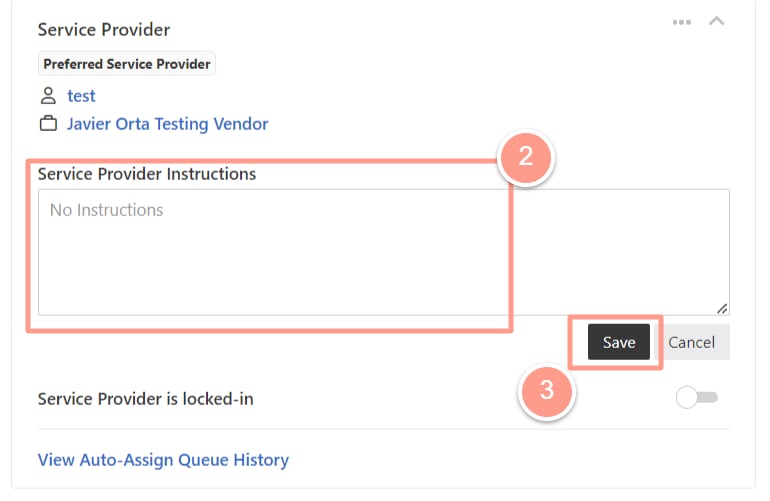 And that's how easily you can add Service Provider instructions!