> ## Documentation Index
> Fetch the complete documentation index at: https://help.latchel.com/llms.txt
> Use this file to discover all available pages before exploring further.
# How to Assign Service Provider to a Territory / Zip Code
> This capability of managing service providers' assignments based on service territories will significantly reduce the need to repeat and manage service provider setup across various entities (such as Portfolios, and Properties)
You should assign your service provider territory/zip code(s) when you do not want a service provider outside of a property's territory/zip code(s) to be contacted when a work order comes in.
Learn how to assign a service provider to a specific territory/zip code for new and existing service providers.
### **Assigning a specific territory/zip code for a new Service Provider.**
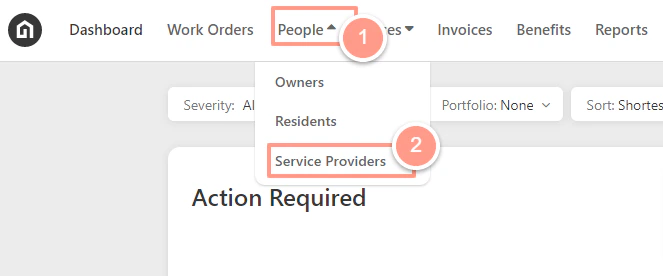
On the Latchel dashboard click **People** then select **Service Provider** on the dropdown.
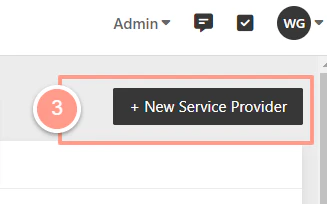
 Click on **+** **New Service Provider** located on the right side of the service provider page.
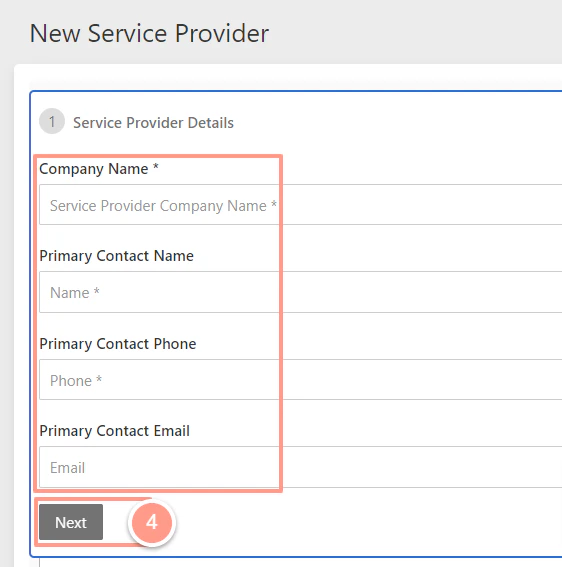
 Fill out the service provider information then click **Next**.
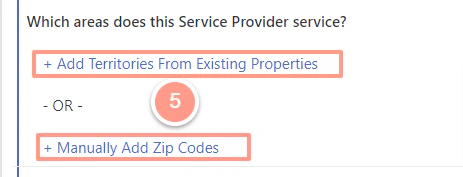
 After adding the appropriate skills, on the bottom part of the page choose either **Add Territories From Existing Properties** or **Manually Add Zip Codes**.
 When you have assigned the territory click **Add** then **Save**.
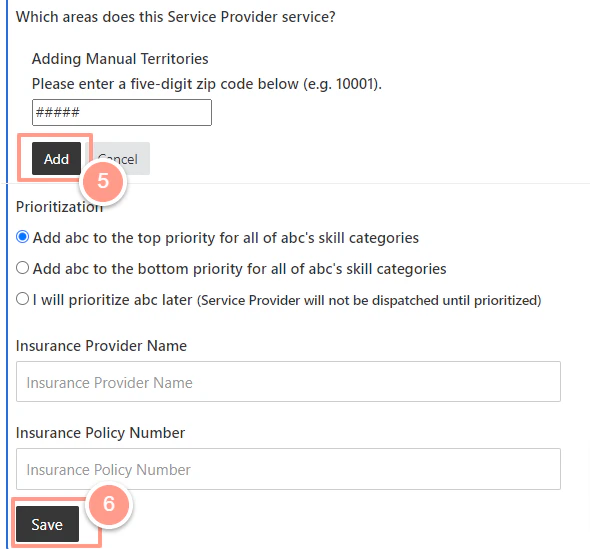 ### **Assign a specific territory/zip code to an existing service provider.**
On the Latchel dashboard click **People** then select **Service Provider** on the dropdown.
### **Assign a specific territory/zip code to an existing service provider.**
On the Latchel dashboard click **People** then select **Service Provider** on the dropdown.
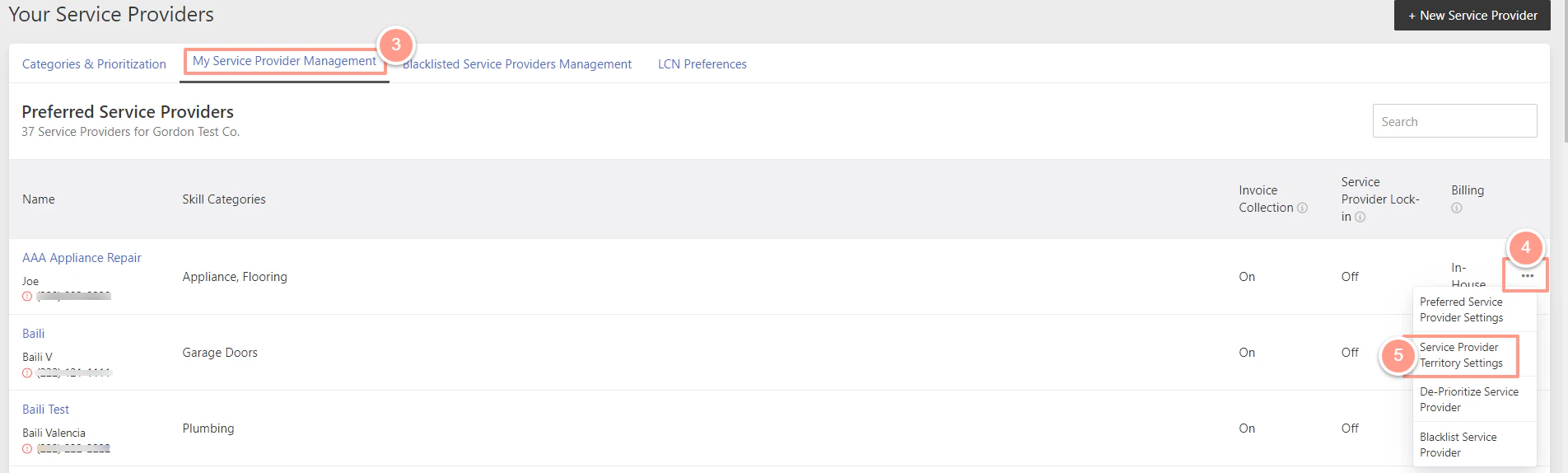
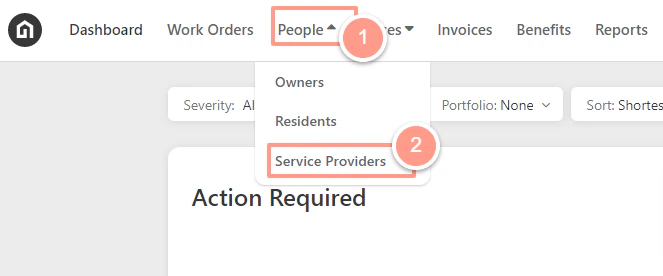 Under the **My Service Provider Management** tab, identify the service provider and click its corresponding\*\* ellipsis icon **then choose** Service Provider Territory Settings\*\* from the dropdown.
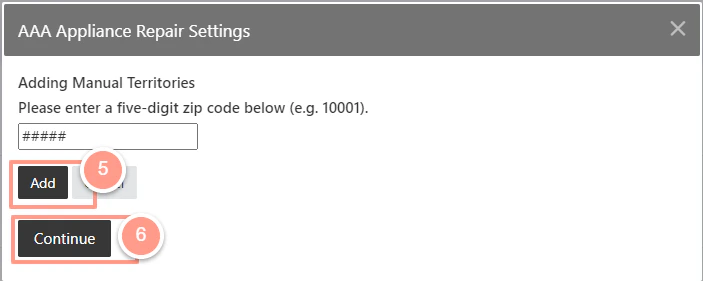
 Then choose either **Add Territories From Existing Propertie**s or **Manually Add Zip Codes.**
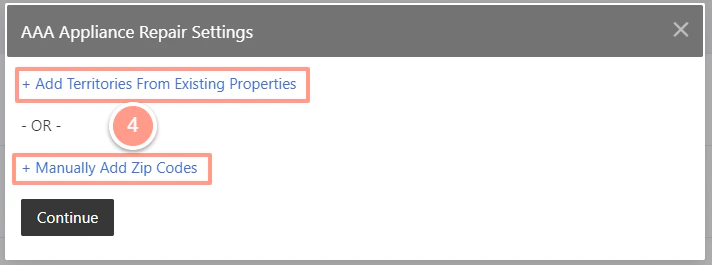 When you have assigned the territory click **Add** then **Continue.**
 **FAQs:**
The Service Provider will be dispatched to all work orders regardless of the location based on service provider prioritization and configuration at the Company, Portfolio, and/or Property level.
Latchel console will prompt you to add the property's zip code to the service provider's service territory list. At this point, you could either update their area or abort adding the service provider
Latchel console will present you with a list of zip code/s within the portfolio not covered by the Service Provider. At this point, you could update their area with one or all of the zip codes that are in the portfolio and not covered by the service provider. *Note: service providers will only be dispatched to the zip codes added to the service provider service territory list.*
**FAQs:**
The Service Provider will be dispatched to all work orders regardless of the location based on service provider prioritization and configuration at the Company, Portfolio, and/or Property level.
Latchel console will prompt you to add the property's zip code to the service provider's service territory list. At this point, you could either update their area or abort adding the service provider
Latchel console will present you with a list of zip code/s within the portfolio not covered by the Service Provider. At this point, you could update their area with one or all of the zip codes that are in the portfolio and not covered by the service provider. *Note: service providers will only be dispatched to the zip codes added to the service provider service territory list.*