> ## Documentation Index
> Fetch the complete documentation index at: https://help.latchel.com/llms.txt
> Use this file to discover all available pages before exploring further.
# How to Report Bugs and Issues with our Tools
> To enable our tech team to resolve your issue quickly, we will need details of what you are experiencing. The process below will guide you to provide those details. You will need to use Google Chrome to execute this process.
In the event of running our software or data sync tools, if you come across a bug or if the tool gets stuck, please report it to us so we can continue to improve your experience with our product.
First, you will need to open your Property Management System to use the tool.
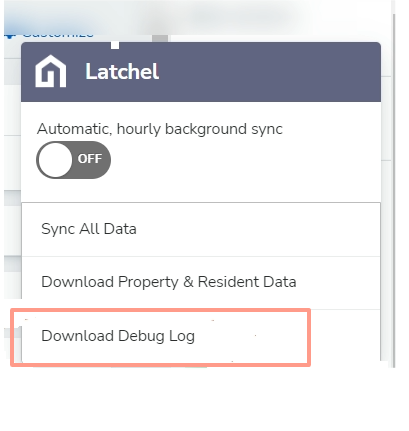
The Latchel data sync has a debug tool that inspects each action taken on a page and shows the issues found. To open that tool, click on the floating Latchel logo on your Property Management System dashboard and select "**download debug log**" from the dropdown menu.
 #### **Share it with us**
The file you downloaded will be automatically saved to your computer downloads.
Go to your email account to send this file via email to the Customer Success team - [success@latchel.com](mailto:success@latchel.com)
In the body of the email, please provide a short description of what has happened and let us know where you are experiencing this issue. Please also paste the link to your video (press Ctrl V). See below a template you can use to submit your issue:
**Template:**
* My name:
* This is what I was trying to do:
* This is what happened:
* This is where I experienced the issue (include the link to the webpage):
* This is the link to the screen recording:
* If you have questions, use this contact information:
#### **Share it with us**
The file you downloaded will be automatically saved to your computer downloads.
Go to your email account to send this file via email to the Customer Success team - [success@latchel.com](mailto:success@latchel.com)
In the body of the email, please provide a short description of what has happened and let us know where you are experiencing this issue. Please also paste the link to your video (press Ctrl V). See below a template you can use to submit your issue:
**Template:**
* My name:
* This is what I was trying to do:
* This is what happened:
* This is where I experienced the issue (include the link to the webpage):
* This is the link to the screen recording:
* If you have questions, use this contact information: