> ## Documentation Index
> Fetch the complete documentation index at: https://help.latchel.com/llms.txt
> Use this file to discover all available pages before exploring further.
# Updating Work Order on Waiting For Materials Status
> This help guide will walk you through updating the schedule of a work order that is in a **Waiting for Materials** status. Additionally, it will show you how to send a reminder to the service provider if you are uncertain of the service provider's availability.
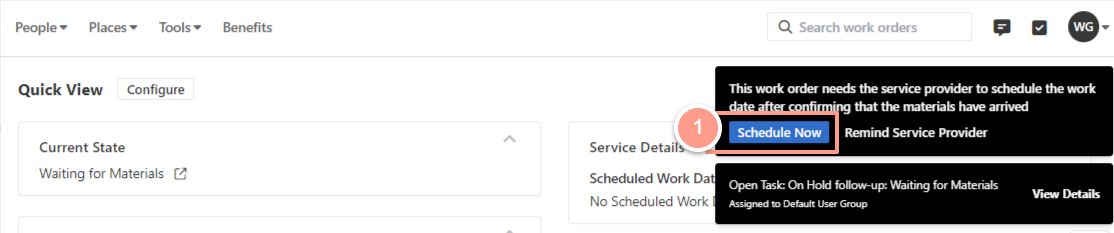
#### **Schedule Now**
From the work order page click **Schedule Now** located at the top right corner.
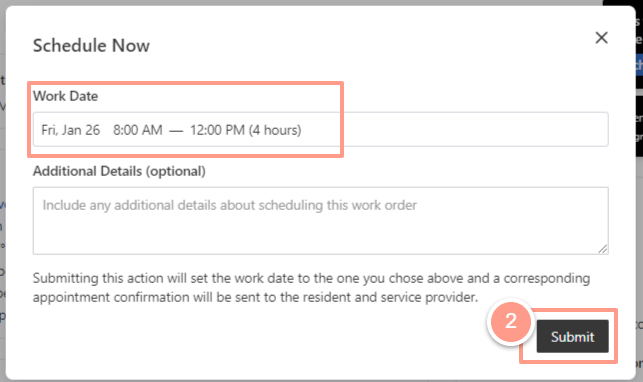
 Adjust the date and time of the work date if needed, then hit **Submit.**
 #### **Remind Service Provider**
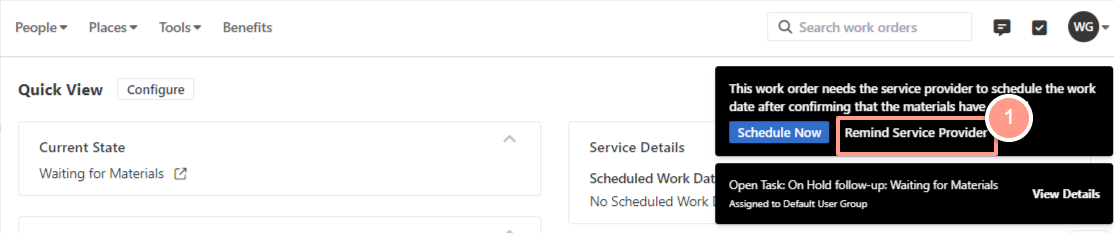
If you have no idea about the availability of the service provider, click the **Remind Service Provider** on the upper right corner of the page.
#### **Remind Service Provider**
If you have no idea about the availability of the service provider, click the **Remind Service Provider** on the upper right corner of the page.
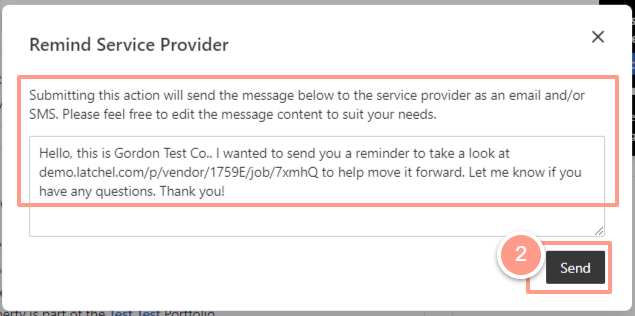
 From here you could add some additional details, or just hit the **Send** button.
 And that's how you can update a work order on a waiting for materials status!
**Are you looking for a guide on how to update resident's availability on a work order? Check out this help guide:** [**How to Update the Resident's Availability**](/s/topic/0TO5e000000h9wqGAA/How-to-Update-the-Resident-s-Availability)
And that's how you can update a work order on a waiting for materials status!
**Are you looking for a guide on how to update resident's availability on a work order? Check out this help guide:** [**How to Update the Resident's Availability**](/s/topic/0TO5e000000h9wqGAA/How-to-Update-the-Resident-s-Availability)