> ## Documentation Index
> Fetch the complete documentation index at: https://help.latchel.com/llms.txt
> Use this file to discover all available pages before exploring further.
# How to Update a Work Order Title
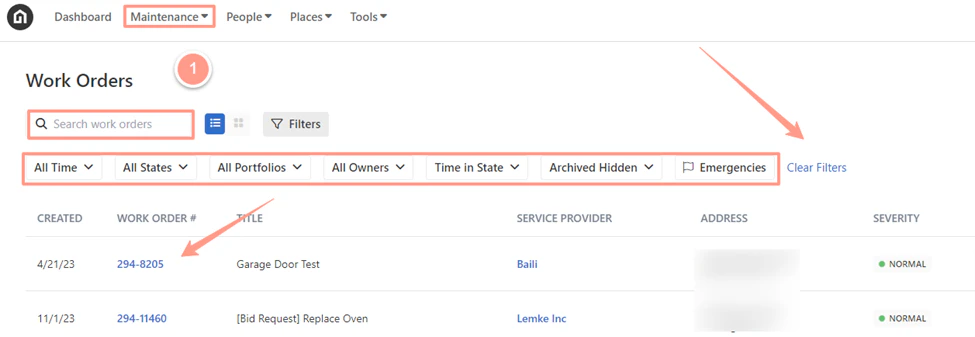
> From the dashboard, click on **Maintenance**, open the work order by either **searching and/or clicking the specific order number**.
You can also use the **Filter** and **Clear Filters** option for a more refined search. To learn more about how to use the Filter, check out this help guide: [**How to Use the Filter Options in the Work Order Tab Page.**](/s/topic/0TO5e000000h9wqGAA/How-to-Use-the-Filter-Options-in-the-Work-Order-Tab-Page)
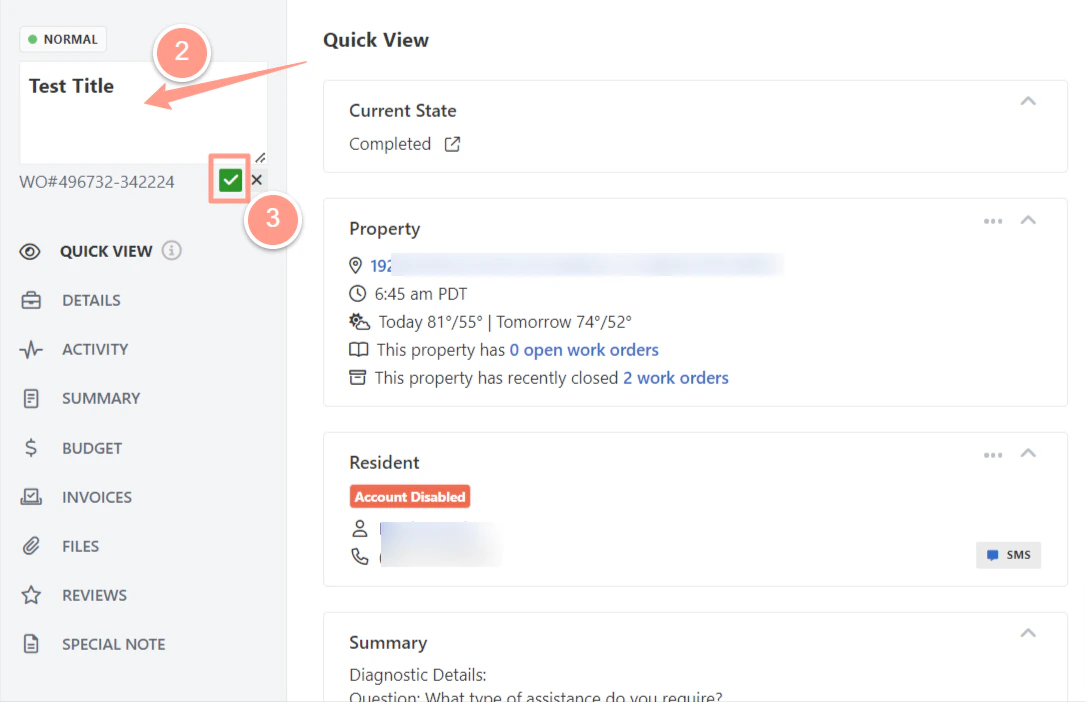
 From the work order page, click the **current title** to activate it. Then type in your preferred work order title. Don't forget to click the **green check** icon to save the changes.
 **Do you also need to update the work order number? Follow the steps from this help guide:** [**How to Change Work Order Number (New Experience)**](/s/topic/0TO5e000000h9wqGAA/How-to-Change-a-Work-Order-Number-New-Experience)