> ## Documentation Index
> Fetch the complete documentation index at: https://help.latchel.com/llms.txt
> Use this file to discover all available pages before exploring further.
# How to Update the Service Provider Payment Method on File
> Easily keep your payments on track by updating or changing your Service Provider’s payment method in just a few steps.
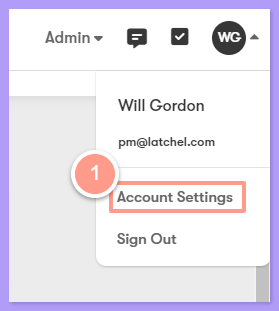
On the Latchel portal click the account icon dropdown and select **Account Settings**.
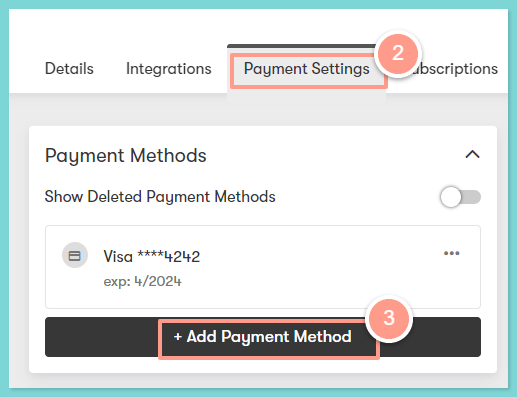
 In the Account Setting page on the **Payment Settings** tab, go to the **Payment Methods** then select **Add Payment Method**.
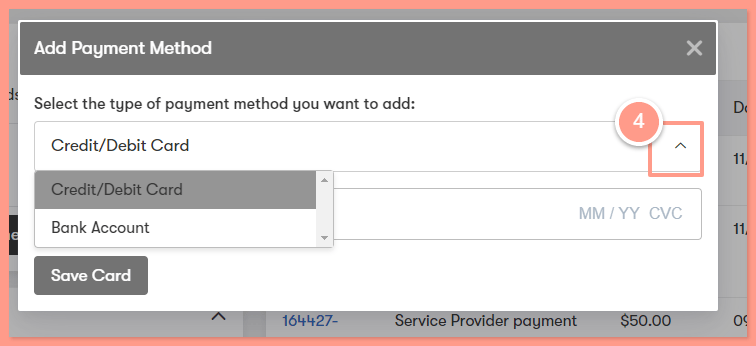
 In the Add Payment Method, select the type of payment -- **Credit/Debit Card** or **Bank Account**. Then add the required details depending on the payment method you choose.
 If your preferred payment method is already added, go to the **Payment Settings** located under the Payment Methods section. From there, you can set the **Service Provider Payment Method**. Click **ellipsis** on the Payment Settings, and choose either **Change Payment Method** or **Remove Payment Method**.
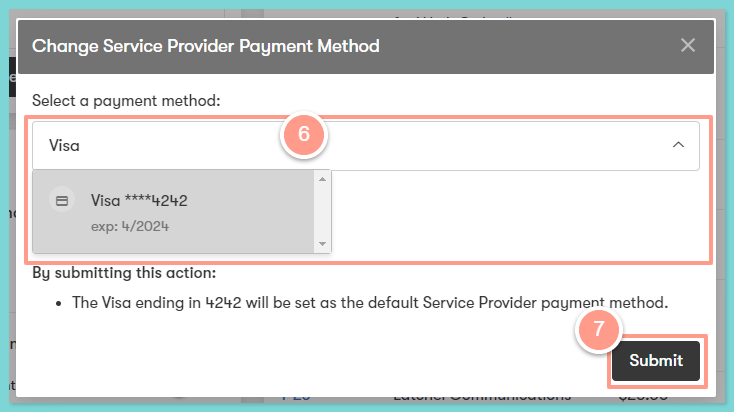
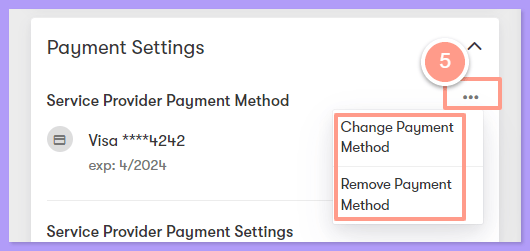 If you choose **Change Payment Method,** select another payment method from the dropdown option and click **Submit**.