> ## Documentation Index
> Fetch the complete documentation index at: https://help.latchel.com/llms.txt
> Use this file to discover all available pages before exploring further.
# How to Update the Work Order Summary
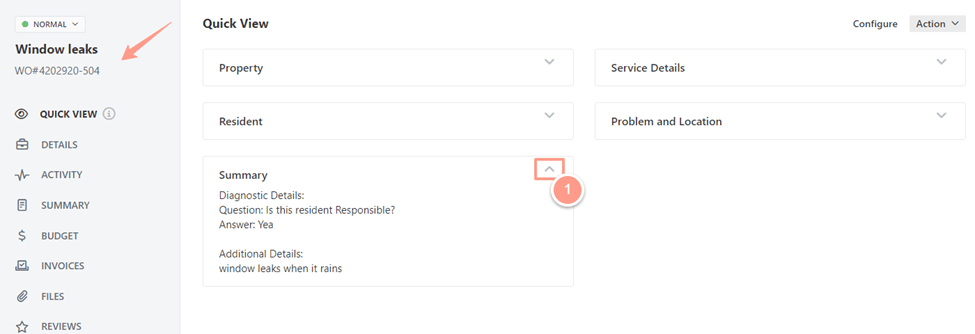
> From the work order page, find the **Summary** from the **Quick View**. To open summary information, click on the **arrow down**.
You will be able to see information about the work order as the work order creator can share as many details as possible to understand the maintenance concern of the resident. Here are the common items on a work order summary:
* Diagnostic Details
* Questions Is this resident Responsible?
* Answer:
* Additional Details
 To modify the **work order details**, click on the **Summary tab** and start editing information that may help the service provider to understand the issue better. Once done, click on **Save**.
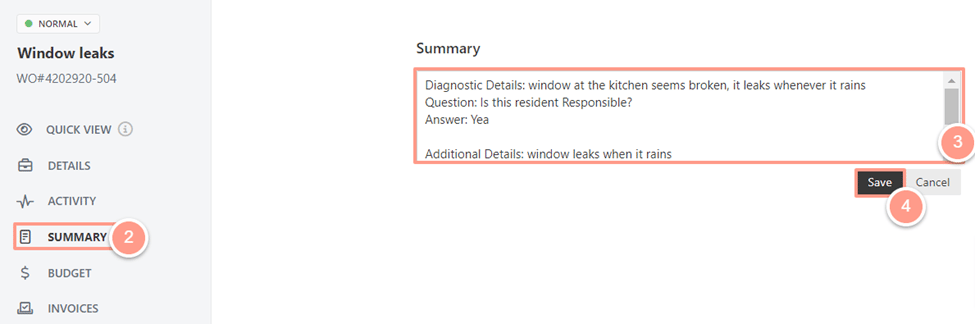 And that's as easy as 1, 2, 3! You have successfully updated your work order summary!