> ## Documentation Index
> Fetch the complete documentation index at: https://help.latchel.com/llms.txt
> Use this file to discover all available pages before exploring further.
# Task Notification Settings
> **There are 2 types of task notifications:**
1. Receive an email when a user group you are a member of is assigned to a task.
2. Receive daily task summaries which include the number of tasks assigned to you and the number of tasks assigned to your groups.
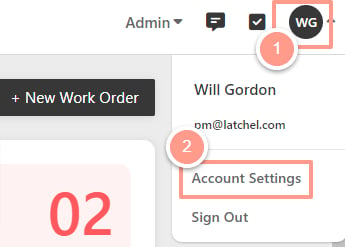
Click on your initials or profile picture in the upper right-hand corner of the dashboard, and select **Account Settings**.
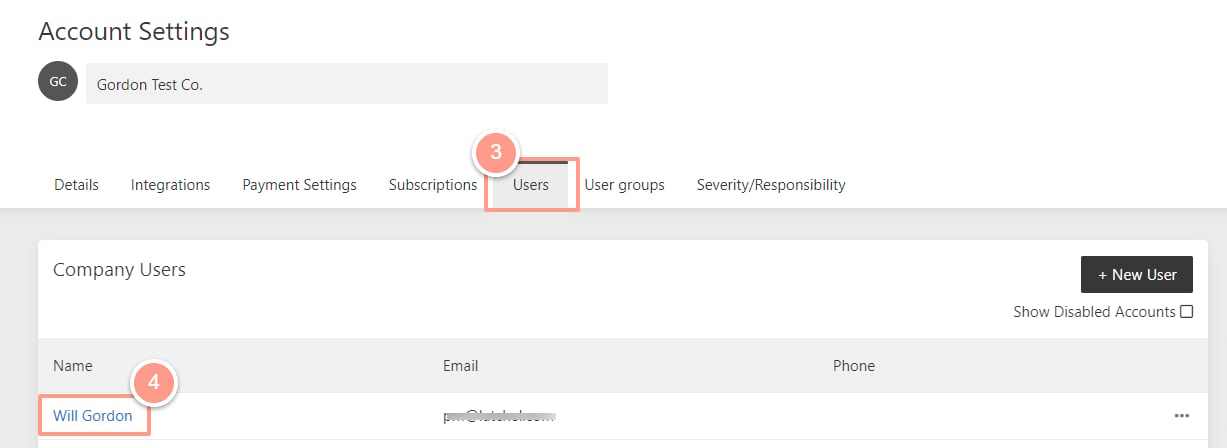
 Click on the **Users** tab, and then select a user.
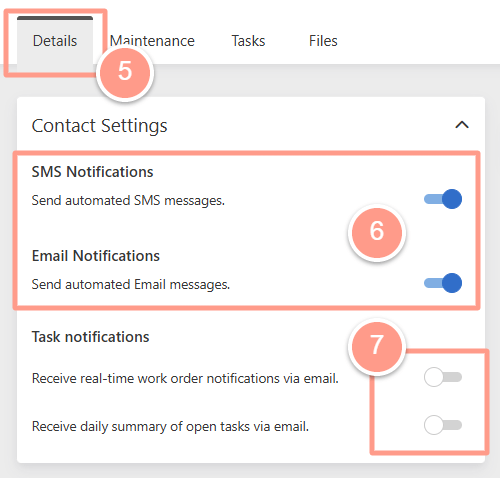
 In the user profile under the **Details** tab, you will see the **Contact Settings** section. From there you can toggle the task notification settings **ON** (positioned to the right) or **OFF** (positioned to the left).
Enable any of the following **SMS and/or email notification** options:
* Receive real-time work order notifications via email.
* Receive a daily summary of open tasks via email.
In the user profile under the **Details** tab, you will see the **Contact Settings** section. From there you can toggle the task notification settings **ON** (positioned to the right) or **OFF** (positioned to the left).
Enable any of the following **SMS and/or email notification** options:
* Receive real-time work order notifications via email.
* Receive a daily summary of open tasks via email.