> ## Documentation Index
> Fetch the complete documentation index at: https://help.latchel.com/llms.txt
> Use this file to discover all available pages before exploring further.
# Updating the Latchel Data Sync Extension
> If you're experiencing issues with your Latchel Data Sync, it may be due to an outdated version of the browser extension. This guide will walk you through the steps to update the extension to the latest version to ensure continued compatibility and performance.
### **Uninstall Old, Reinstall New**
Log out from your property management software. Remove the current Latchel Data Sync extension from your browser, then refresh the page.
You can also remove the extension by accessing your browser settings.
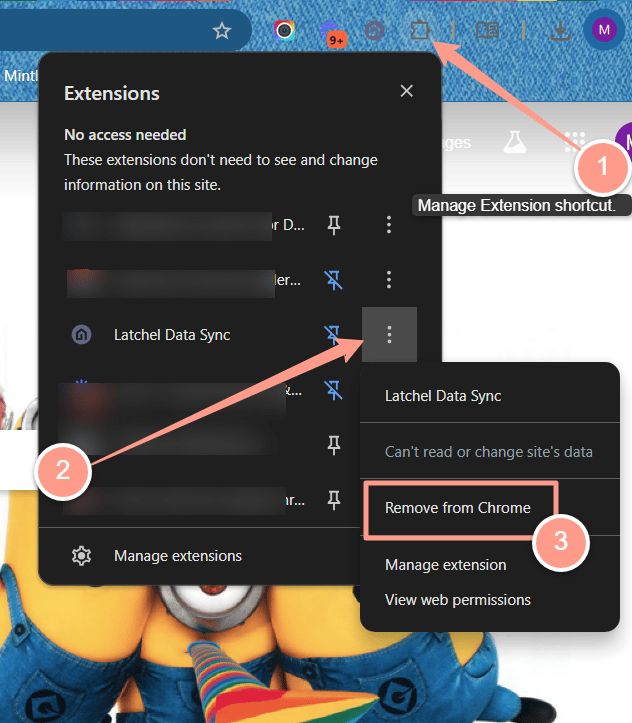 **Reinstall the latest version** by following the guide below.
Follow this guide to download and install the latest version of the Latchel Data Sync Extension.
Open the extension and log in using your Latchel credentials.
**Reinstall the latest version** by following the guide below.
Follow this guide to download and install the latest version of the Latchel Data Sync Extension.
Open the extension and log in using your Latchel credentials.
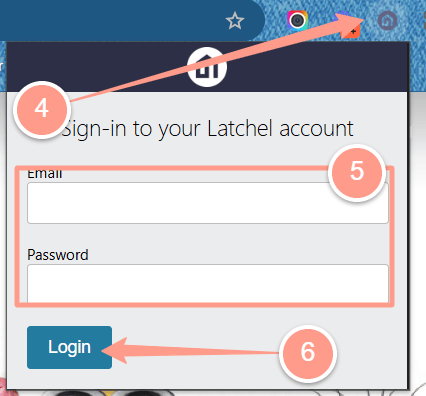 Log back into your property management system, and attempt to resync again.
.png?fit=max&auto=format&n=GSDw3EED3pagF1PV&q=85&s=0b5481ce29cb9427d68a4bc416b0a8b0) ### **Still having issues after updating?**
Check how you can report this to Latchel by following the steps in:
Follow these steps to report issues with Latchel after updating your extension.
### **Still having issues after updating?**
Check how you can report this to Latchel by following the steps in:
Follow these steps to report issues with Latchel after updating your extension.