> ## Documentation Index
> Fetch the complete documentation index at: https://help.latchel.com/llms.txt
> Use this file to discover all available pages before exploring further.
# Work Order Processing with Intake Settings
> The **Work Order Processing** flow in Intake Settings determines how incoming maintenance requests are classified, routed, and resolved based on the rules you set. By using plain-language conditions, you control whether a work order is marked as **Emergency, Urgent, Normal, or Resident-Responsible.**
### **How Work Orders are Processed**
1. **Resident Submits a Request**
* Residents enter issue details and answer any troubleshooting or follow-up questions configured in your Intake Settings.
 2. **Troubleshooting Stage**
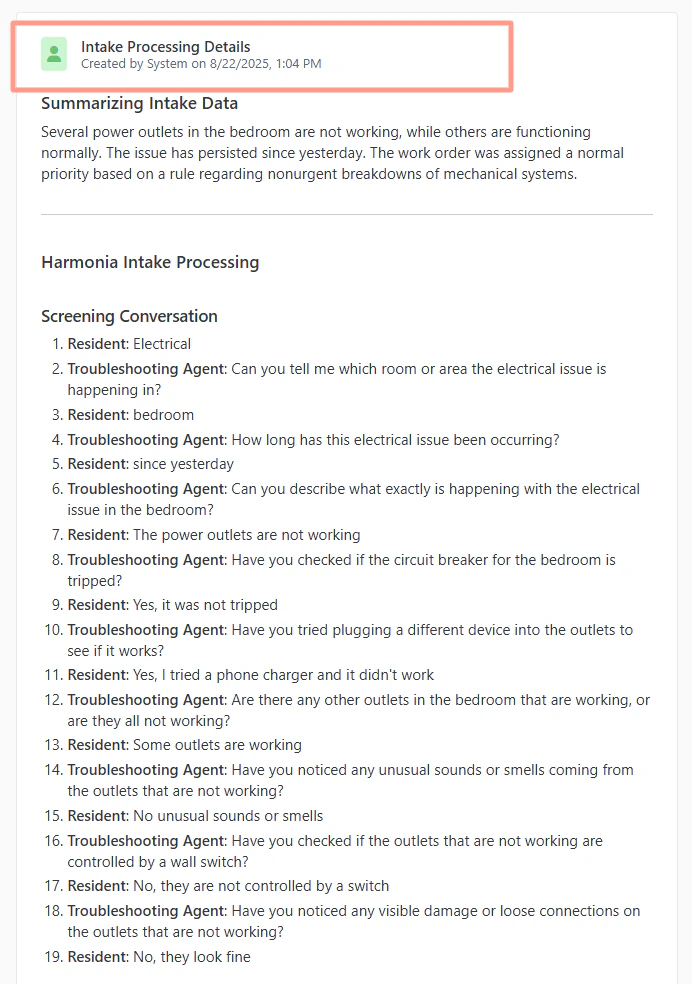
* The resident is guided through step-by-step troubleshooting to rule out simple fixes (e.g., checking circuit breakers or filters).
* Residents can provide plain-text responses, photos, and availability during this stage.
3. **Rule Matching**
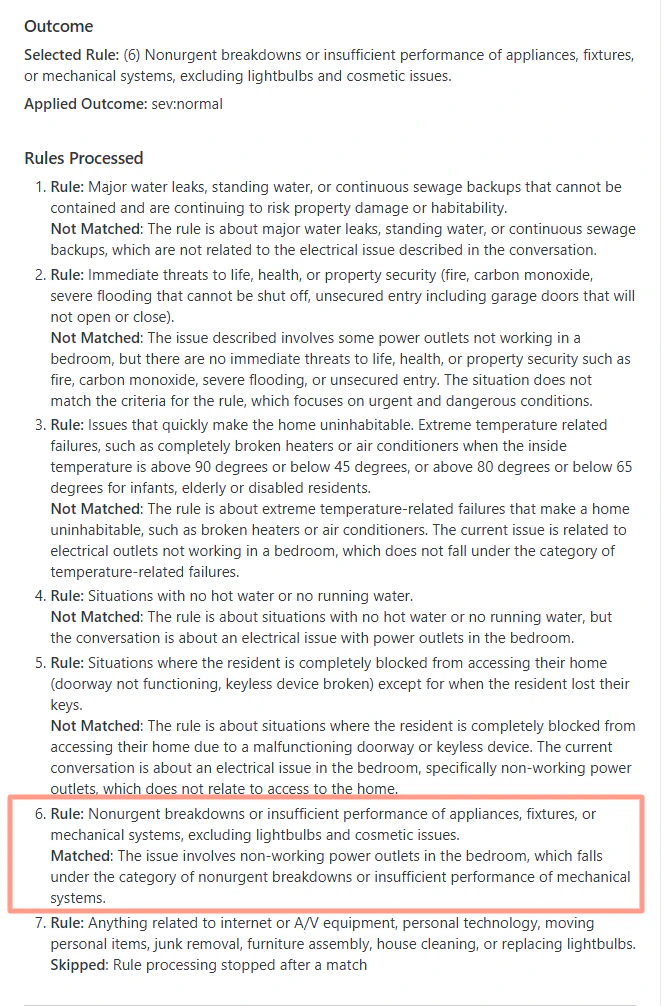
* The request runs through your **custom Intake rules**, in order from top to bottom.
* When a rule matches, the system applies the classification you defined (Emergency, Urgent, Normal, or Resident-Responsible).
* If no rule matches, the request can be routed to a property manager for approval.
2. **Troubleshooting Stage**
* The resident is guided through step-by-step troubleshooting to rule out simple fixes (e.g., checking circuit breakers or filters).
* Residents can provide plain-text responses, photos, and availability during this stage.
3. **Rule Matching**
* The request runs through your **custom Intake rules**, in order from top to bottom.
* When a rule matches, the system applies the classification you defined (Emergency, Urgent, Normal, or Resident-Responsible).
* If no rule matches, the request can be routed to a property manager for approval.
 4. **Classification Outcome**
Based on the rule match, the work order is automatically categorized:
* **Emergency** → Immediate action required; dispatched quickly.
* **Urgent** → Prompt response, but not life-threatening.
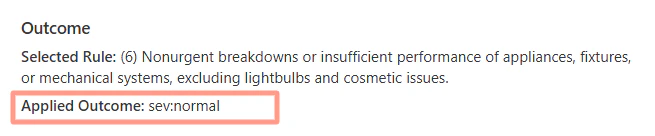
* **Normal** → Standard maintenance timeline.
* **Resident-Responsible** → the work order is cancelled, the resident is informed they must coordinate and pay for the service themselves.
4. **Classification Outcome**
Based on the rule match, the work order is automatically categorized:
* **Emergency** → Immediate action required; dispatched quickly.
* **Urgent** → Prompt response, but not life-threatening.
* **Normal** → Standard maintenance timeline.
* **Resident-Responsible** → the work order is cancelled, the resident is informed they must coordinate and pay for the service themselves.
 5. **Activity Log Transparency**
Each processed work order includes a log showing:
* The resident’s answers to troubleshooting questions.
* Which rule was applied and why.
* Any skipped rules and the reason they did not apply.
5. **Activity Log Transparency**
Each processed work order includes a log showing:
* The resident’s answers to troubleshooting questions.
* Which rule was applied and why.
* Any skipped rules and the reason they did not apply.