> ## Documentation Index
> Fetch the complete documentation index at: https://help.latchel.com/llms.txt
> Use this file to discover all available pages before exploring further.
# Outbound Voice for Vendors
> Let Latchel's AI make the follow-up calls to your vendors — on demand or every single day — so status chasing comes off your team's plate.
### **What is Outbound Voice?**
Latchel has always answered the phone for you. Now it can pick it up on your behalf, too.
**Outbound Voice** is Latchel's newest AI Voice capability, and it flips the maintenance coordination script: instead of your team calling vendors to ask "did you make it out there?" or "when's the invoice coming?", Latchel's AI voice agent makes that call for you — with full context on the work order, the vendor's history, and what still needs to happen.
There are two ways to put it to work:
You decide when. One click, and the AI calls the vendor to get an update — included free with your maintenance subscription.
Latchel decides when. The AI independently calls each vendor once a day to chase every open job that needs an update — currently free during our launch promotion.
Every call comes back to you as a full transcript and summary, and — just like maintenance intake — you can rate the call to help train your company's AI model.
**Want to see (and hear) it in action?** Watch the launch webinar recording below.
### **How It Works**
The AI agent takes the same actions a vendor could take themselves in their Latchel portal — confirming or rescheduling an appointment, collecting an invoice, checking on a job's status — and it has full context going in:
* Every active work order assigned to that vendor
* Any prior calls or texts about those jobs, so it doesn't ask the vendor to repeat themselves
* Whether a call is even worth making that day — if there's nothing new to discuss, no call goes out
If the vendor asks for something the AI can't resolve, it doesn't guess — it creates a task for your team with the details, so a human picks it up from there.
**Vendors stay in control too.** A vendor can tell the AI they'd prefer to be called at a specific time of day, and Latchel will call them at that time going forward.
### **Steps to Activate**
### 1. Turn On Automated AI Calls
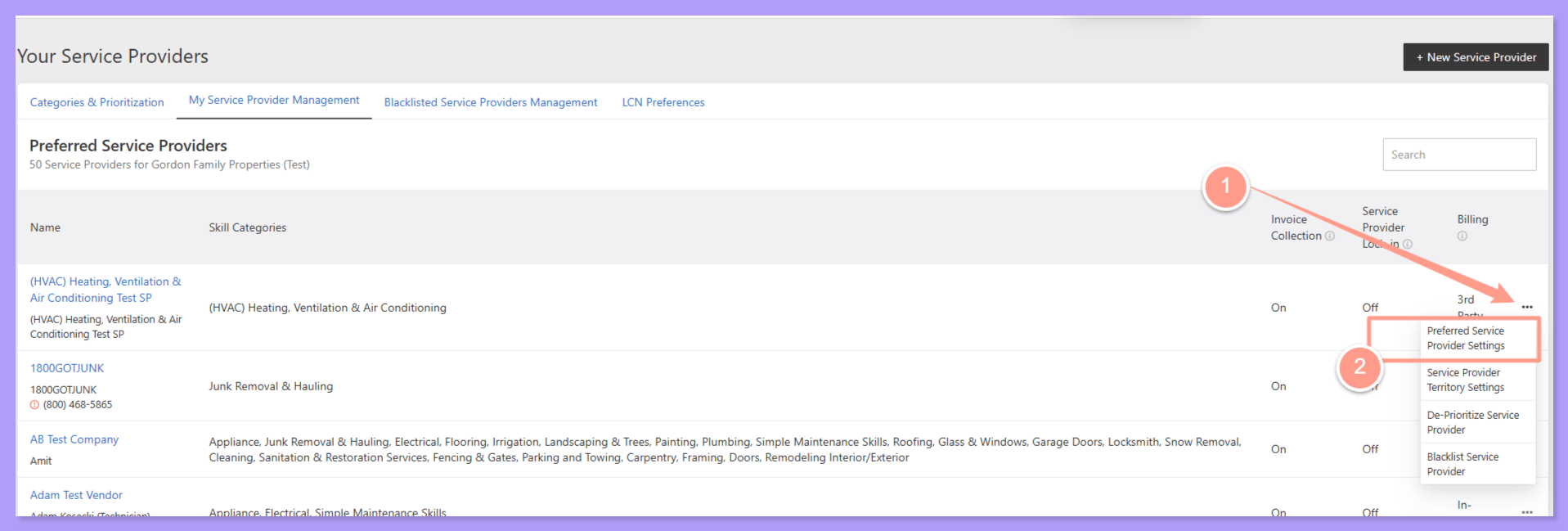
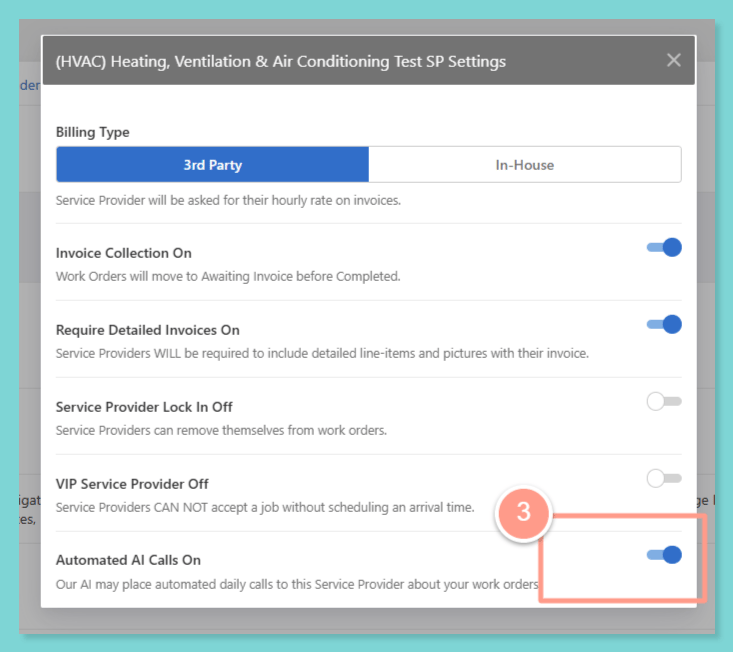
Look for the service provider and go to Preferred Service Provider Settings.
The switch is on if it turned blue.
### **2. Call Service Provider via AI**
Click-to-Call is live for every PM today — there's nothing to opt into or turn on.
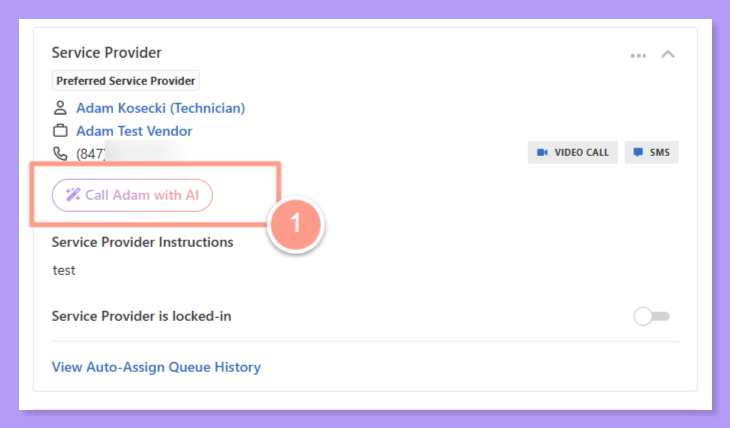
You'll see the option to trigger an AI call directly from the work order whenever you want a status update from that vendor.
The AI places the call, and you'll get a transcript and summary back once it's done.
Click-to-Call is fully rolled out — the early opt-in requirement has been removed, and the call button now appears automatically for every PM.
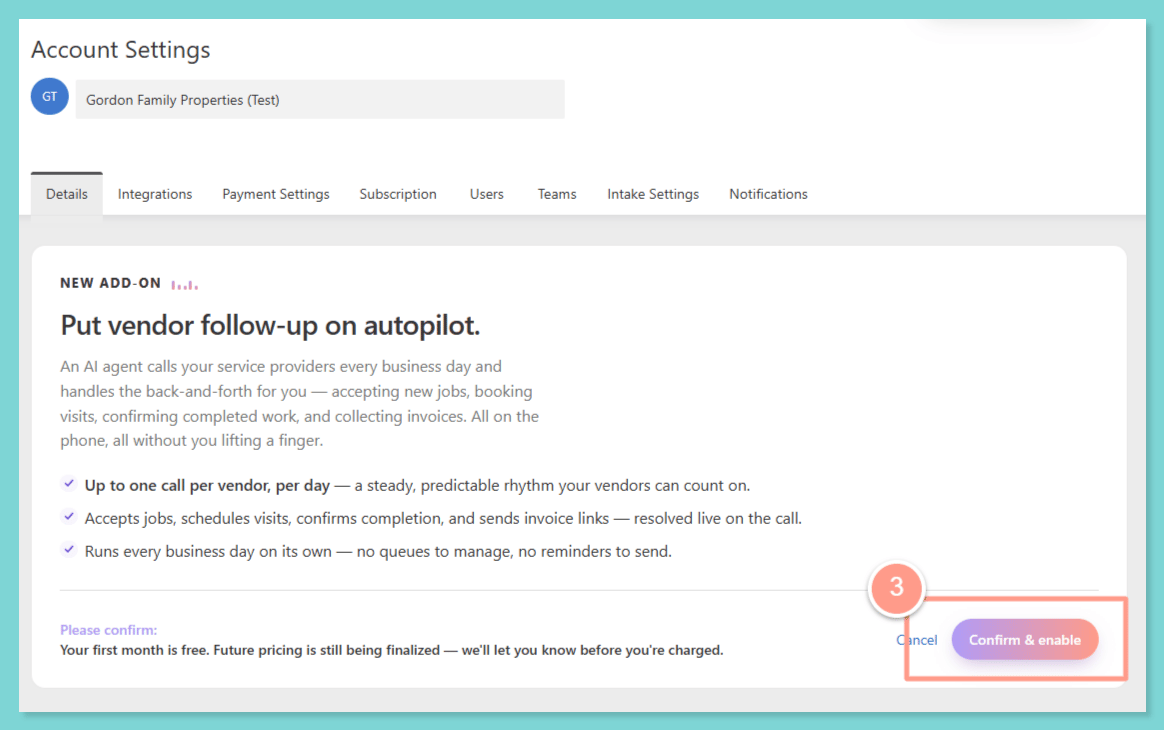
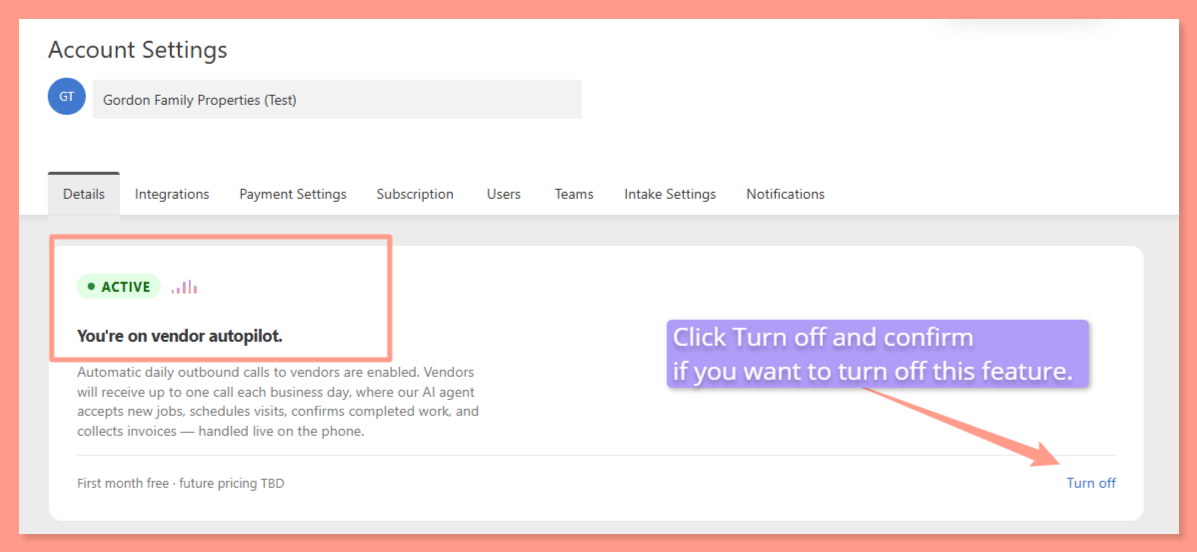
### **3. Automated Daily Calls**
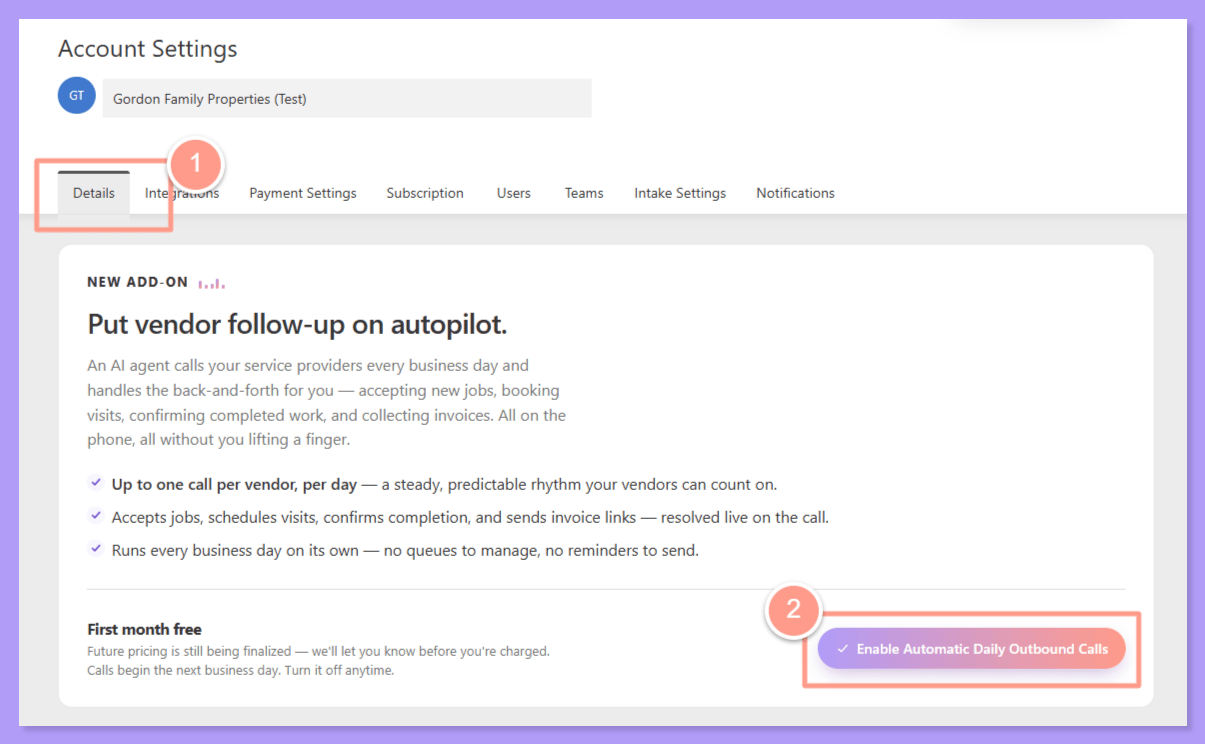
Look for the automated outbound calling option and switch it on.
There's no lengthy setup — Latchel begins making daily calls to your vendors with open work orders starting the next business day.
If a vendor is already responsive through the portal and doesn't need a check-in call, you can turn automated calling off for that vendor individually in their settings.
Don't see the toggle yet, or want a walkthrough first? Email [success@latchel.com](mailto:success@latchel.com) and your Success Manager can activate it for you or set up a quick call.
### **Requirements & Eligibility**
**Click-to-Call** is included at no extra cost in every Latchel maintenance package, forever — it's live on every account today with no opt-in or upgrade required.
**Automated Daily Calls** will eventually be a paid upgrade to your maintenance subscription. For a limited time, it's included free so you can try it before pricing goes into effect. New customers who sign up with Latchel this quarter also get a free trial period.
**Not a Latchel customer yet? You can request a live demo of Outbound Voice and the rest of the AI Voice suite:**
### Frequently Asked Questions
**Click-to-Call** only happens when someone on your team clicks the call button — Latchel will never place that call on its own. Automated Daily Calls run independently: once turned on, Latchel calls each vendor once a day (at their preferred time, if they've set one) to check on every open job, with no click required from your team.
Every vendor with relevant open work orders gets one call a day, all around the same time. If there's nothing new to check on for a vendor that day, no call goes out — Latchel only calls when it's worth the vendor's time.
Yes. If a vendor already manages their jobs well through the portal, you can turn off automated calling for just that vendor in their individual settings while keeping it on for everyone else.
Yes. Vendors can tell the AI their preferred time of day (or days of the week), and Latchel will call them as close to that time as possible going forward.
Yes. When the AI calls about a job, it has context on everything else that vendor has scheduled and will walk through the full list of relevant work orders in that same call.
It creates a task inside Latchel for your team with the details, so a person can pick it up — nothing falls through the cracks.
If a vendor responds in Spanish, the call automatically switches to Spanish. A setting to default the call to start in Spanish for specific vendors is on our near-term roadmap.
Yes. Every outbound call — click-to-call or automated — comes with a full transcript and summary, and you can rate it with a thumbs up or down. That feedback helps train your company's AI model.
Not currently — there's no hard limit on reschedules. If you're on the Analytics+ package, you can request custom reports to track reschedule counts per vendor and flag repeat offenders.
That's a related feature already live today: if a service provider is scheduled to visit a property and a new issue comes in that they can also handle, Latchel can automatically attach it to that visit (when auto-approval is enabled in your settings) — cutting down on extra truck rolls.
Latchel logs a short "no answer" note on the relevant work order(s) instead of generating a full call summary — so your activity feed stays accurate about what actually happened, and no time is wasted trying to summarize silence. This applies to both Click-to-Call and Automated Daily Calls.
Yes. When Latchel builds a day's call agenda, it sometimes leaves a work order off — for example, if it was already covered on a call a couple of days ago or there's nothing new to raise. When that happens, a note is added directly to that work order explaining why it was skipped, so you can see the reasoning instead of wondering if it was forgotten.
Both. If a vendor calls your Latchel line and their number is recognized, AI Voice can also handle that inbound call — so the experience is consistent whether Latchel calls the vendor or the vendor calls in.
Have questions after reading this? Reach out anytime at [success@latchel.com](mailto:success@latchel.com) — we're happy to walk through setup live.