> ## Documentation Index
> Fetch the complete documentation index at: https://help.latchel.com/llms.txt
> Use this file to discover all available pages before exploring further.
# June 2, 2025
> The following are the Latchel updates for the week of June 2, 2025.
### **New Features**
1. **Time-Saving Work Order Creation Options Just Launched!**
* **Create from the Resident Profile Page**
Need to submit a work order for a specific tenant? Now you can do it directly from the resident’s profile page!\
The system automatically pulls in the resident and property info – so you skip the address search and get right to it.
* **“Create Another Work Order” with One Click**
After submitting a work order, you’ll now see a **“Create Another Work Order”** button. This puts you back into the creation flow with key info (like the selected property and vacancy status) pre-filled, so you can keep things moving without starting from scratch. This is especially useful when creating work orders as part of Inspections and Projects.
2. **Seamless File & Photo Previews on Work Orders**
Viewing attachments just got a major upgrade! You can now **preview all files and images directly within a work order** — no more opening new browser tabs or downloading files just to take a quick look.
Simply click to open a **carousel-style preview** and scroll through everything in one place. Whether it’s resident uploads or vendor photos, you’ll save time and stay focused!
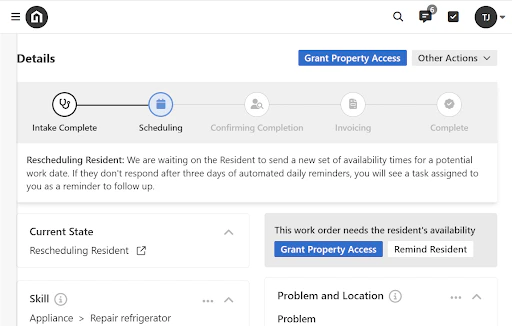
3. **Latchel’s Automation Is Now Visualized on Every Work Order**
Wondering what’s happening behind the scenes after you submit a work order? Now you don’t have to guess.
We’ve launched a new **visual progress tracker** at the top of every work order page that shows exactly where a job stands in Latchel’s automation flow — from **intake to completion**.
 4. **Feedback needed! Customizable Emergency Definitions**
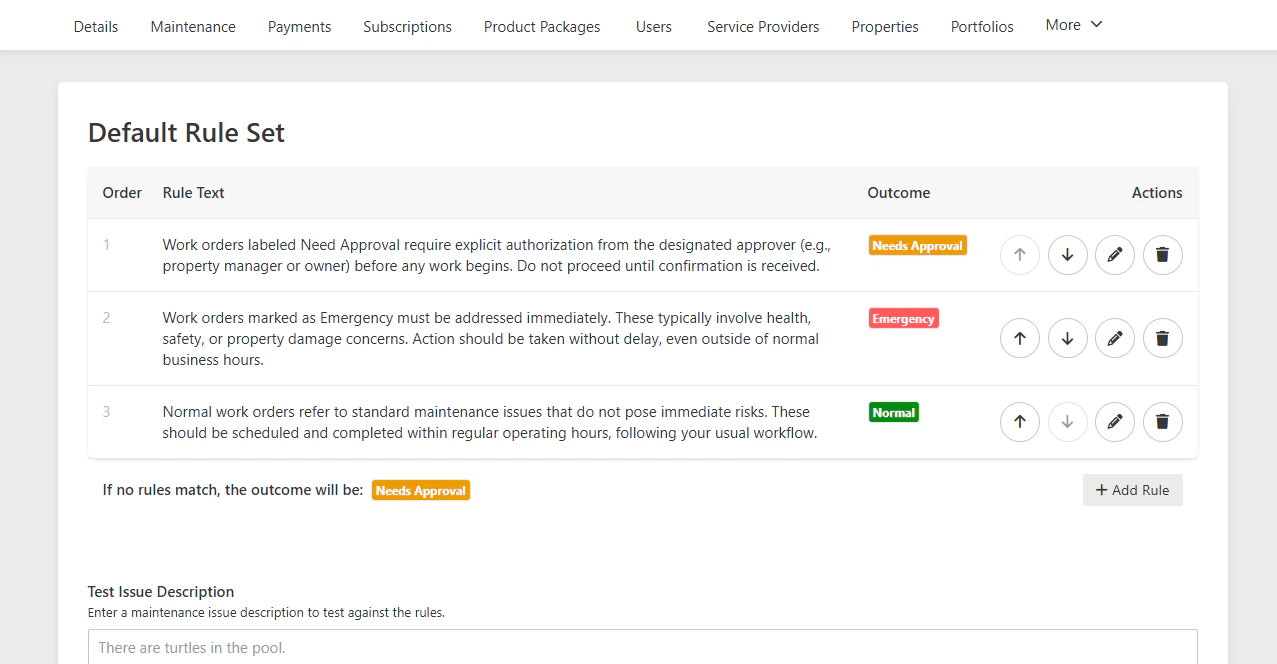
Ever wanted to fine-tune how Latchel handles incoming work orders? **Sign up** for a ***15 minute user interview*** at the link below to get a sneak peak and influence our product roadmap.
4. **Feedback needed! Customizable Emergency Definitions**
Ever wanted to fine-tune how Latchel handles incoming work orders? **Sign up** for a ***15 minute user interview*** at the link below to get a sneak peak and influence our product roadmap.
 ### **Resolved Bugs**
**Accurate “On Hold” Messaging for Jobs with Canceled Appointments**
**We resolved a bug that was causing some confusion:**
Previously, customers might see a message like ***“This job is on hold”*** or ***“The future appointment has been cancelled”*** — even when the appointment was earlier in the day or no future appointment existed.
**What's Fixed:**
Now, these messages are only sent when a job had a future appointment scheduled that was later canceled or placed on hold. No more premature alerts or mixed signals.
### **Special Announcements**
**New Training Videos Available!**
Do you have team members who need Latchel training? Need a refresher on how best to utilize Latchel?
We have created **6 new training videos** just for you! Access **Getting Started** below!
These Getting Started Help Guides are built for property managers to learn the basics, whether you’re new or just need a refresher.
If you have new team members or want a refresh, we encourage you to watch the above videos and book additional time for live training with our Customer Success Team. Book training to: [success@latchel.com](mailto:success@latchel.com)
### **Resident Benefits**
**New Insurance Partnership with Beagle!**
We partnered with Beagle because they provide the most effective insurance and resident benefit solutions in the industry. Their fully managed programs—including AI-powered insurance verification, tenant liability waivers, and security deposit alternatives—are designed to boost property manager revenue while enhancing tenant satisfaction. With seamless integration into our existing systems and a hands-off implementation process, Beagle enables us to deliver superior value to both property owners and residents.
### **We’re Building for You**
Got 60 seconds? Help shape the future of Latchel.\
We’re on our 10th newsletter — and we want to hear from the people who matter most: you.
**Tell us: What’s working? What’s missing? What would make your job easier?**
Your insight helps us build features that ***actually*** solve your problems. Let’s create the tools you’ve been waiting for.
### **Interested in learning more about Latchel's products? Book a meeting with us.**
### **Resolved Bugs**
**Accurate “On Hold” Messaging for Jobs with Canceled Appointments**
**We resolved a bug that was causing some confusion:**
Previously, customers might see a message like ***“This job is on hold”*** or ***“The future appointment has been cancelled”*** — even when the appointment was earlier in the day or no future appointment existed.
**What's Fixed:**
Now, these messages are only sent when a job had a future appointment scheduled that was later canceled or placed on hold. No more premature alerts or mixed signals.
### **Special Announcements**
**New Training Videos Available!**
Do you have team members who need Latchel training? Need a refresher on how best to utilize Latchel?
We have created **6 new training videos** just for you! Access **Getting Started** below!
These Getting Started Help Guides are built for property managers to learn the basics, whether you’re new or just need a refresher.
If you have new team members or want a refresh, we encourage you to watch the above videos and book additional time for live training with our Customer Success Team. Book training to: [success@latchel.com](mailto:success@latchel.com)
### **Resident Benefits**
**New Insurance Partnership with Beagle!**
We partnered with Beagle because they provide the most effective insurance and resident benefit solutions in the industry. Their fully managed programs—including AI-powered insurance verification, tenant liability waivers, and security deposit alternatives—are designed to boost property manager revenue while enhancing tenant satisfaction. With seamless integration into our existing systems and a hands-off implementation process, Beagle enables us to deliver superior value to both property owners and residents.
### **We’re Building for You**
Got 60 seconds? Help shape the future of Latchel.\
We’re on our 10th newsletter — and we want to hear from the people who matter most: you.
**Tell us: What’s working? What’s missing? What would make your job easier?**
Your insight helps us build features that ***actually*** solve your problems. Let’s create the tools you’ve been waiting for.
### **Interested in learning more about Latchel's products? Book a meeting with us.**