> ## Documentation Index
> Fetch the complete documentation index at: https://help.latchel.com/llms.txt
> Use this file to discover all available pages before exploring further.
# August 10, 2026
The following are the Latchel updates for the week of August 10, 2026.
### **New Features**
1. **AI Voice for Vendors — Outbound Calls That Chase Status For You**
Following up with vendors is one of the most repetitive parts of a maintenance operation. Now it's one you can hand off.
**What's New!**
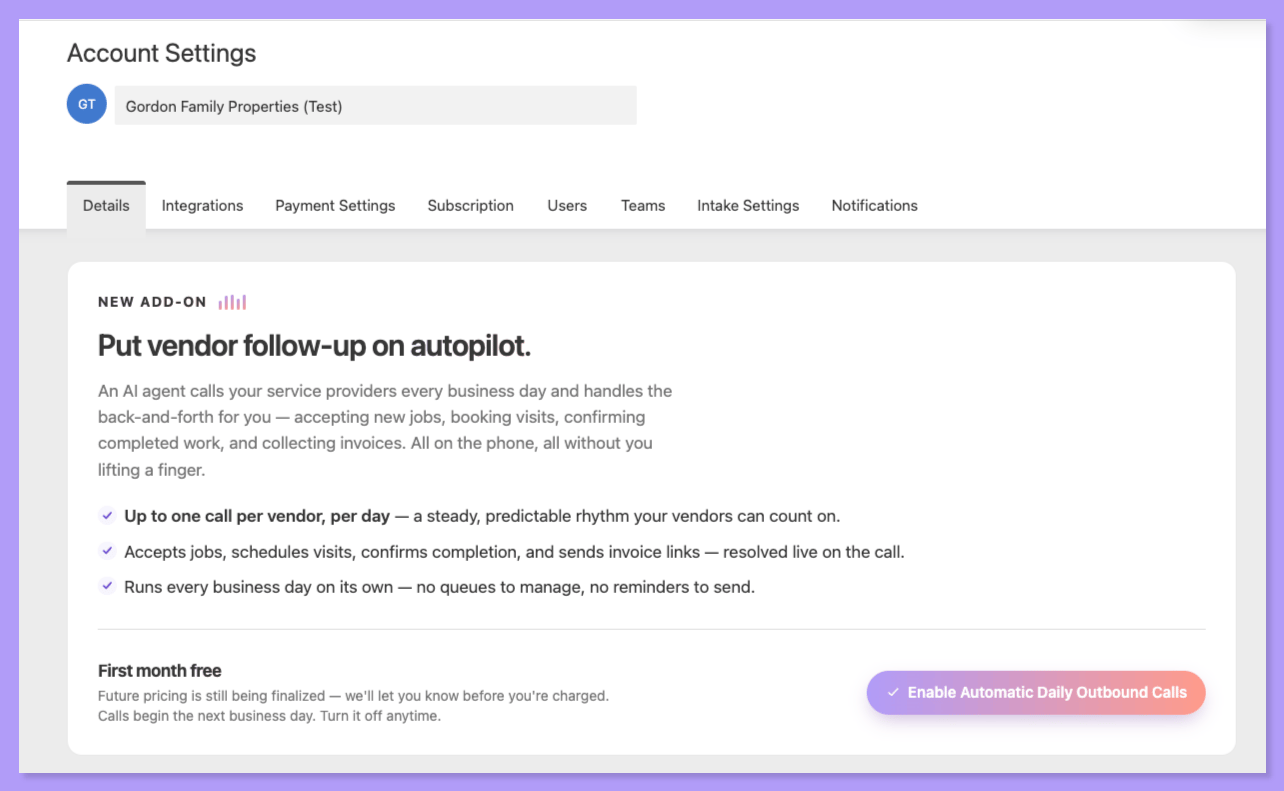
We've extended **AI Voice** to outbound vendor calls. You can trigger a call on demand, or set Latchel to call automatically every day:
* Manually trigger an outbound AI voice call to a vendor to chase status on one or more open work orders
* Automate daily calls to a vendor to chase status across their open jobs
* The AI agent takes the same actions a vendor can self-service in their portal — and generates a task for your team when a request falls outside of what it can handle
* Vendors can set their own contact preferences, so outreach lands the way they prefer to be reached
**Why This Matters:**
Status chasing stops living on your team's to-do list. Instead of your coordinators working a call list, Latchel works it — and you only get pulled in when something actually needs a human decision.
**Put Vendor Follow-Up on Autopilot**
Prefer not to think about it at all? Turn on **automatic daily calls** and Latchel builds the day's agenda, calls the vendor every business day, and writes back to every work order it discussed — including a note explaining why it deliberately skipped one, so you can see the reasoning instead of wondering whether a job got forgotten.
**Turn it on my going to your Account Settings page!**
**Miss our webinar on this? Watch the recording below!**
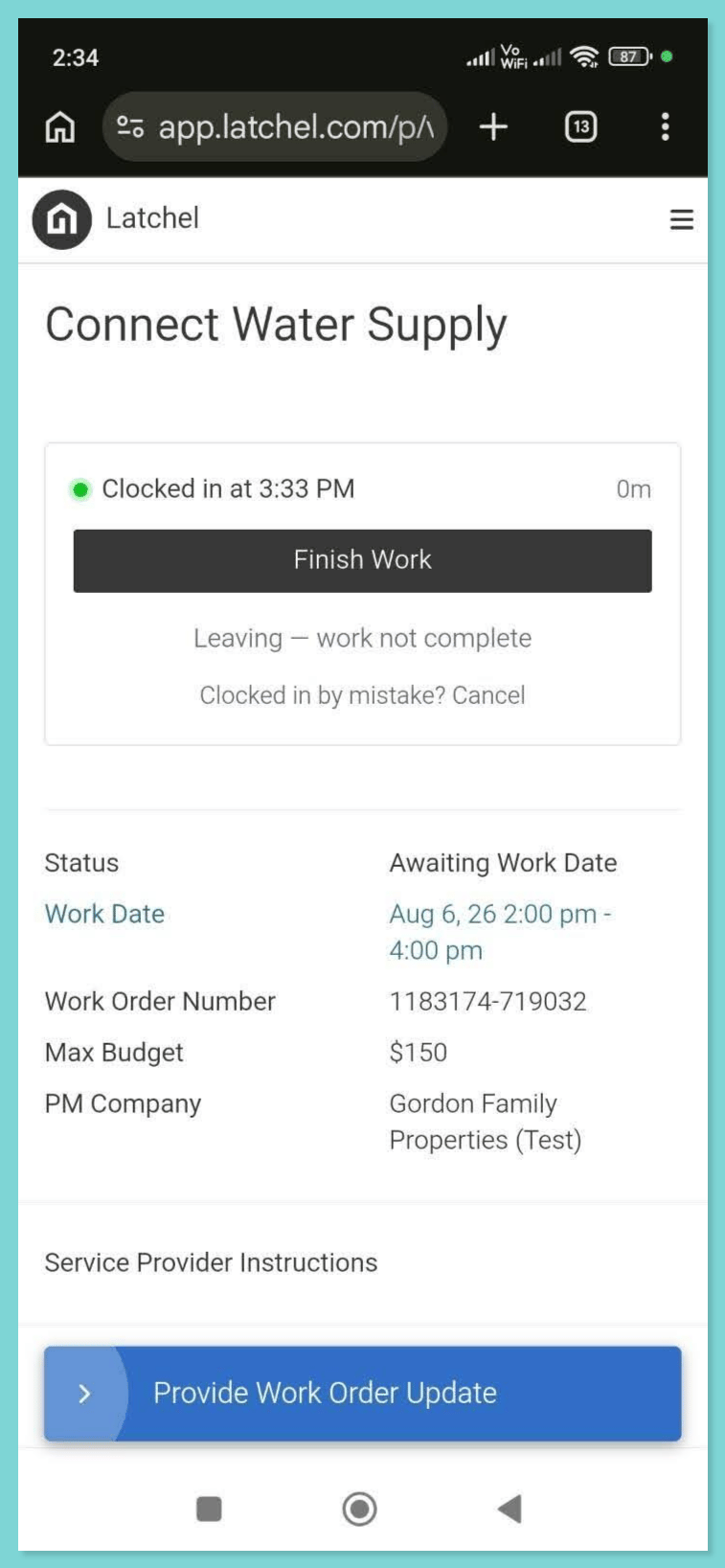
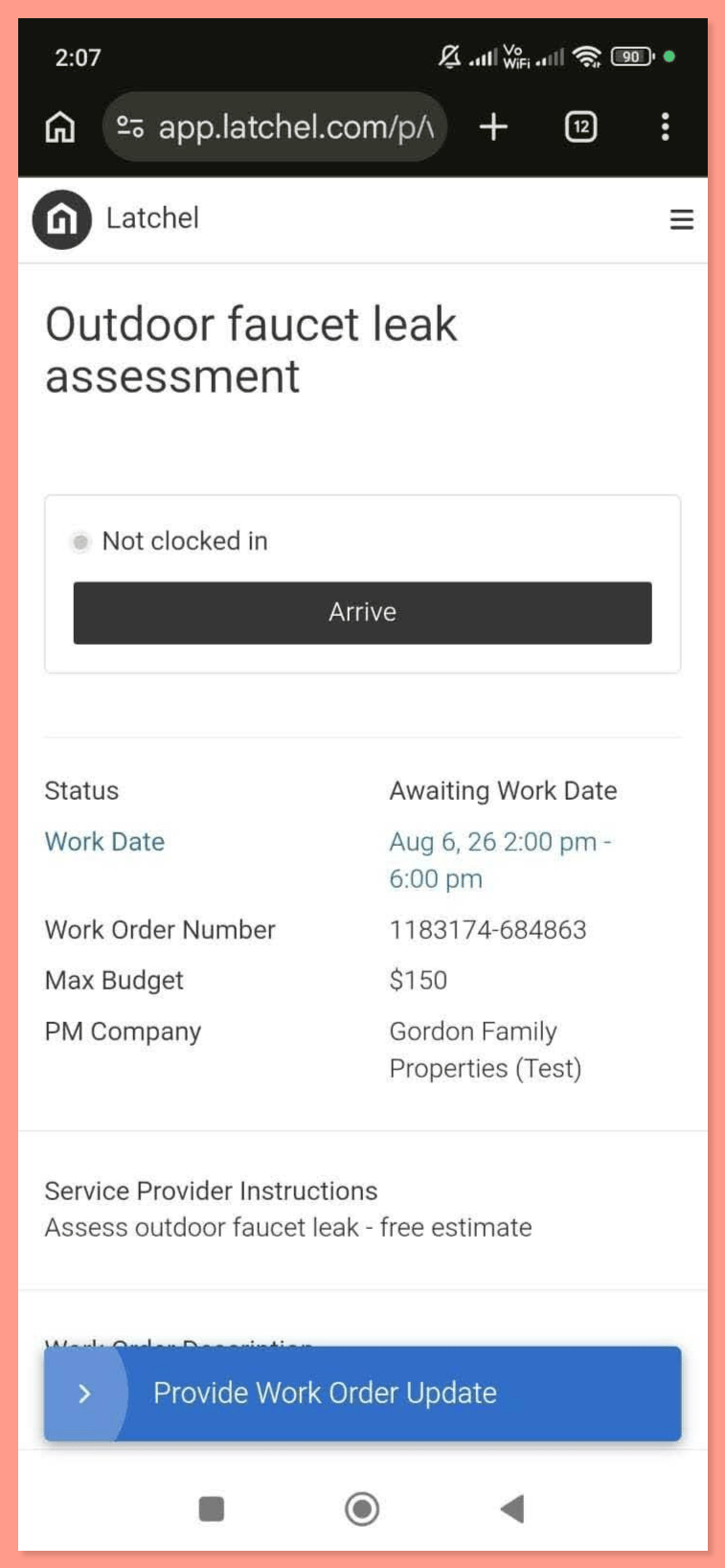
2. **Clock In / Clock Out and Timesheets for In-House Techs**
Do you run in-house maintenance techs? They now have a one-tap — or hands-free voice — way to mark when they arrive at and finish a job.
* Techs can clock out mid-job to note they're leaving before work is complete, then clock back in when they return
* If a tech forgets to clock out, we default to one hour of logged time — and if they clock out after more than two hours, we add a confirmation step so the record stays accurate
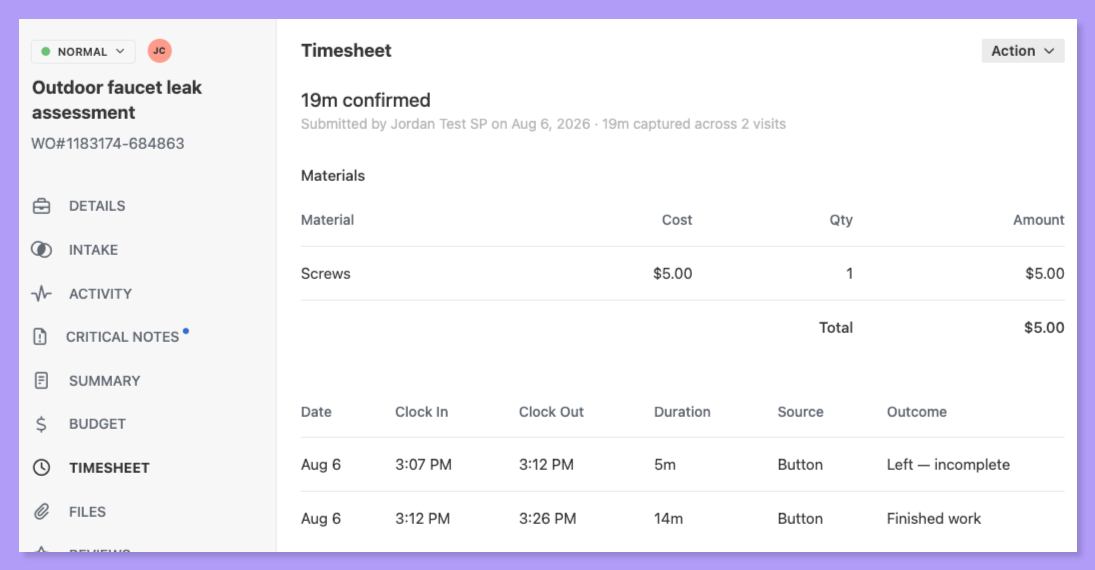
* On work orders where the assigned service provider is an in-house tech, Invoices now appear as **Timesheets**
**From your tech's side:** one tap to arrive, one tap to finish — right from their Latchel dashboard. They can also correct a mistimed entry, attach photos of the work, and log the materials they used.
**From your side:** every visit rolls up on the work order's **Timesheet** tab, with clock-in and clock-out times, total time captured across visits, and materials with costs — all in one place.
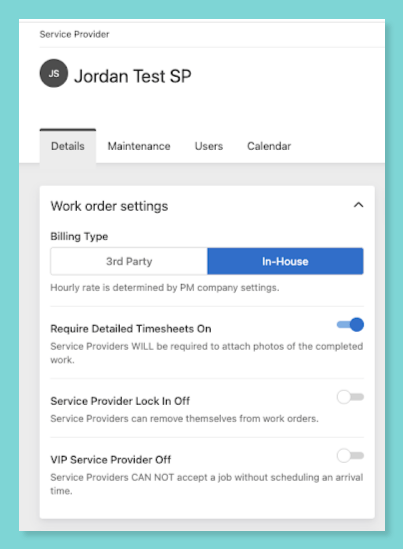
**Want to ensure your techs upload photos?** Open the tech's service provider profile and toggle on **Require Detailed Timesheets**.
This release also includes some **UI cleanup** in your **Preferred Service Provider settings**.
The result is labor time that's captured at the job, not reconstructed at the end of the week.
3. **Latchel Is Now an Anthropic Community Connector**
Remember **Latchel MCP** — the connector that lets you talk to your Latchel account in plain English from Claude or ChatGPT? It just got easier to turn on.
Anthropic has approved Latchel as a community connector, so our listing is now live in Claude's directory. Instead of pasting in a custom connector URL, you can find Latchel in the directory, sign in with your Latchel login, and start asking: *"What's still open on work order #4821?"* or *"Open a work order for a leaking faucet at 123 Main St."*
* [See our listing in the Claude connector directory](https://claude.ai/directory/connectors/latchel-mcp)
* Below is the full setup guide for Claude and ChatGPT!
Learn how to setup Latchel's MCP on AI.
Everything stays scoped to your PM company and gated behind your own Latchel login.
(4) **Automated Texts Now Come From Your Assigned Number**
We've cleaned up where our automated text messages come from. Every automated text Latchel sends now goes out from your **Assigned Number** — the same maintenance or general intake line your residents already call.
**Why This Matters:**
When an automated text comes from the number residents recognize, their replies land where they can actually be handled — by Latchel's AI and our team — instead of arriving as stray messages your team has to sort out. Fewer one-off texts hitting your inbox, more conversations resolved for you, and work orders that get updated faster.
Your communication number is now used only for texts a PM sends directly. It's no longer used for any automated message.
**What's Next!**
This is groundwork for a much bigger change in how messaging works at Latchel — one that will let the platform handle more of the conversation end to end. Stay tuned: that's our next big feature announcement!
**Did you know?** You can create work orders in Latchel directly from your own systems using our public API — and as of this fix, every one of them gets the same intake and diagnostic treatment as a request that came in by phone or web form. We've also given the docs a refresh: easier to search, and they actually work on your phone.
Forward it to whoever handles integrations on your team!
### **Resolved Bugs**
1. **On-Call Alert History Is Visible Again**
Big thanks to **Insite Property Solutions** for flagging this one!
Shoutout to **Insite Property Solutions** for flagging this one!
**What was happening:**
On-call alerts weren't displaying for property managers — the history came up blank.
**What's fixed:**
On-call alert history now loads correctly so you can see exactly what alerts went out and when — no guessing about after-hours coverage.
2. **API-Created Work Orders Now Complete Diagnostics First**
**What was happening:**
\Work orders created through an API request were being passed along to the PM before diagnostics ran, and some got stuck in the intake processing state entirely — never moving forward on their own.
**What's fixed:**
API-created work orders now run through the full intake and diagnostic flow before they reach you, so they arrive with the details already gathered and don't stall out along the way. If an API-generated work order ever looks stuck, email [success@latchel.com](mailto:success@latchel.com) and we'll take a look.
### **Special Announcements**
**Let Latchel Manage Your AppFolio Sync!**
Keeping your information synchronized between AppFolio and Latchel no longer needs to be something your team manages.
Latchel can now run the synchronization on your behalf — no more monitoring the plugin, running syncs manually, or restarting the process after being logged out. With Latchel managing the sync, your team can:
* Spend less time monitoring the AppFolio plugin
* Avoid manually initiating syncs
* Reduce interruptions caused by expired sessions or unexpected logouts
* Keep information aligned between AppFolio and Latchel
Our team oversees the sync process, giving you greater confidence that your information stays up to date — while your team stays focused on managing operations and serving residents.
Interested in having Latchel manage your AppFolio sync? Contact us at [success@latchel.com](mailto:success@latchel.com) to get started!
### **One Click, 10 Seconds — Rate Our Newsletter**
Only one question is required: how valuable is this newsletter to you? Click a number, hit submit. Everything else — favorite feature, what to build next — is optional if you've got more to say.
We genuinely want to hear from you!
### **Interested in learning more about Latchel's products? Book a meeting with us.**
 **Turn it on my going to your Account Settings page!**
 **Want to ensure your techs upload photos?** Open the tech's service provider profile and toggle on **Require Detailed Timesheets**.
 This release also includes some **UI cleanup** in your **Preferred Service Provider settings**.
The result is labor time that's captured at the job, not reconstructed at the end of the week.
3. **Latchel Is Now an Anthropic Community Connector**
Remember **Latchel MCP** — the connector that lets you talk to your Latchel account in plain English from Claude or ChatGPT? It just got easier to turn on.
Anthropic has approved Latchel as a community connector, so our listing is now live in Claude's directory. Instead of pasting in a custom connector URL, you can find Latchel in the directory, sign in with your Latchel login, and start asking: *"What's still open on work order #4821?"* or *"Open a work order for a leaking faucet at 123 Main St."*
* [See our listing in the Claude connector directory](https://claude.ai/directory/connectors/latchel-mcp)
This release also includes some **UI cleanup** in your **Preferred Service Provider settings**.
The result is labor time that's captured at the job, not reconstructed at the end of the week.
3. **Latchel Is Now an Anthropic Community Connector**
Remember **Latchel MCP** — the connector that lets you talk to your Latchel account in plain English from Claude or ChatGPT? It just got easier to turn on.
Anthropic has approved Latchel as a community connector, so our listing is now live in Claude's directory. Instead of pasting in a custom connector URL, you can find Latchel in the directory, sign in with your Latchel login, and start asking: *"What's still open on work order #4821?"* or *"Open a work order for a leaking faucet at 123 Main St."*
* [See our listing in the Claude connector directory](https://claude.ai/directory/connectors/latchel-mcp)
 * Below is the full setup guide for Claude and ChatGPT!