> ## Documentation Index
> Fetch the complete documentation index at: https://help.latchel.com/llms.txt
> Use this file to discover all available pages before exploring further.
# July 13, 2026
The following are the Latchel updates for the week of July 13, 2026.
**Coming Soon: Outbound Voice Webinar (July 29)**
**From Answering Calls to Making Them: Latchel Voice Levels Up**
Latchel Voice already answers every maintenance call, troubleshoots issues, and creates work orders automatically.
Now it's taking the next step.
Join us live on July 29 as we unveil Outbound Voice—our newest AI capability that proactively reaches out to service providers and residents instead of waiting for calls to come in.
Whether it's following up, collecting information, or handling outbound communication, AI Voice is becoming an even more powerful extension of your maintenance team.
RSVP and you can win 3 free months of unlimited Automated Voice Outbound!
### **New Features**
1. **Create Work Orders with Your Voice**
Creating work orders is now as simple as speaking. Property Managers can now create work orders hands-free using voice commands.
Simply say something like:
> "Create a work order for 2 Avery Street. Jenna is reporting an ant infestation."
Watch demo below!
Latchel captures the details and creates the work order for you—making it even faster to log new maintenance requests.
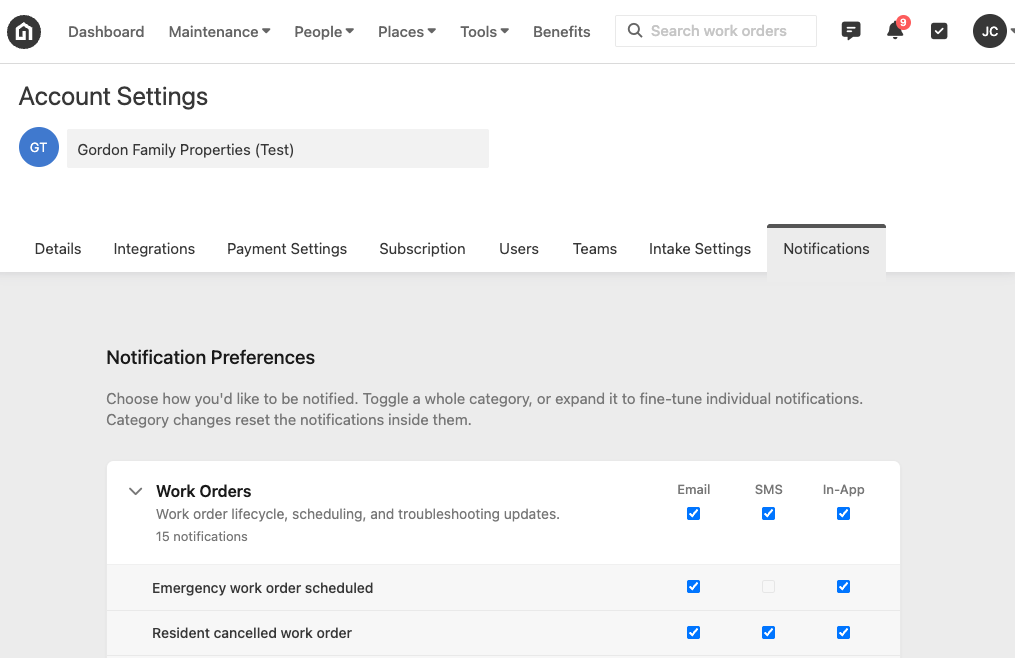
2. **Notification Settings Are Now Live**
Property Managers can now fully customize how they hear from Latchel.
Go to Account Settings > Notifications to choose which events you'd like to be notified about and how you'd like to receive them:
* Email
* SMS
* In-app notifications (New! You’ll see a notification bell in the top right of Latchel)
This gives every PM greater control over their workflow while reducing unnecessary interruptions.
**Coming soon: Control which specific task notifications you want to receive.**
3. **Visor Maintenance Report Cards**
[Visor](https://propertymanagervisor.com/), Latchel’s Analytics and UI enhancement overlay for Appfolio users, now generates a personalized **Maintenance Report Card** every 30 days, giving you an executive summary of your maintenance operation before diving into the details. These insights are especially useful for emergency- and benefits-only customers who don’t have their full operation reflected in [Latchel Analytics.](https://help.latchel.com/s/topic/0TO5e000000h9wqGAA/Latchel-Analytics-Overview#latchel-analytics)
**Each report includes:**
* Executive summary of overall maintenance performance
* Benchmarking against comparable Latchel portfolios
* Vendor performance insights
* Property risk assessments
* Recommended next steps to improve operations
The report serves as your starting point, with links directly into Visor's analytics so you can immediately investigate the areas that need attention. Reports can also be downloaded as PDFs for easy sharing.
Using another PMS and interested in getting access to Visor?
### **Resolved Bugs**
1. **Smarter HVAC and More Emergency Detection Improvements**
We've made several improvements to our Intake Settings emergency decision making.
**What was happening:** Air conditioning requests could occasionally match appliance rules that were intended to exclude HVAC equipment. Additionally, if a key piece of information specified in an intake rule—like the indoor temperature—was missing, Intake could incorrectly assume the issue wasn't an emergency instead of asking the resident.
**What's fixed:**
* Air conditioners, furnaces, heaters, heat pumps, and thermostats are now correctly recognized as HVAC equipment.
* Intake now asks residents for missing information whenever it could change the emergency outcome instead of making assumptions.
* We've upgraded the underlying rule matching engine for improved accuracy across all intake scenarios.
As always, your **custom Intake Settings** take priority if you've configured a different timeframe. **To know more about custom Intake Settings, visit:**
Manage rules for your work orders to match your team's preferences.
2. **Improved User Disable & Reassign Validation**
**What was happening:**
When disabling a Property Manager users could encounter an unexpected error under certain circumstances.
**What's fixed:**
The disable flow now consistently prompts for a replacement property manager whenever reassignment is required, creating a much smoother experience and preventing confusing error messages.
### **Key Ops Process Changes**
**Updated Emergency Guidance for Fire Hazards & Power Shutoffs**
We've expanded our emergency diagnosis guidance to better handle electrical hazards while continuing to respect each property's configured Intake Settings.
**What's changing:**
* Burning smells, sparking, smoke, or visible electrical damage now qualify as potential property damage/emergency hazard situations.
* Teams should always follow the property's Intake Settings when determining whether to dispatch immediately or escalate.
* A hazard is only considered resolved once the affected breaker or disconnect has been confirmed off.
* If electrical hazard signs occurred only in the past and are no longer present—with the breaker confirmed off—the issue should be handled according to the property's normal Intake Settings.
**What this means for you:**
Electrical hazards are handled more consistently while ensuring your customized emergency policies continue to drive dispatch decisions.
**Why this matters:**
It improves resident safety, creates more consistent emergency handling, and reduces unnecessary emergency dispatches when a hazard has already been resolved.
### **One Click, 10 Seconds — Rate Our Newsletter**
Only one question is required: how valuable is this newsletter to you? Click a number, hit submit. Everything else — favorite feature, what to build next — is optional if you've got more to say.
We genuinely want to hear from you!
### **Interested in learning more about Latchel's products? Book a meeting with us.**