> ## Documentation Index
> Fetch the complete documentation index at: https://help.latchel.com/llms.txt
> Use this file to discover all available pages before exploring further.
# June 1, 2026
The following are the Latchel updates for the week of June 1, 2026.
### **New Features**
1. **Intake Settings Rule Analyzer — Write Clearer Rules from the Start**
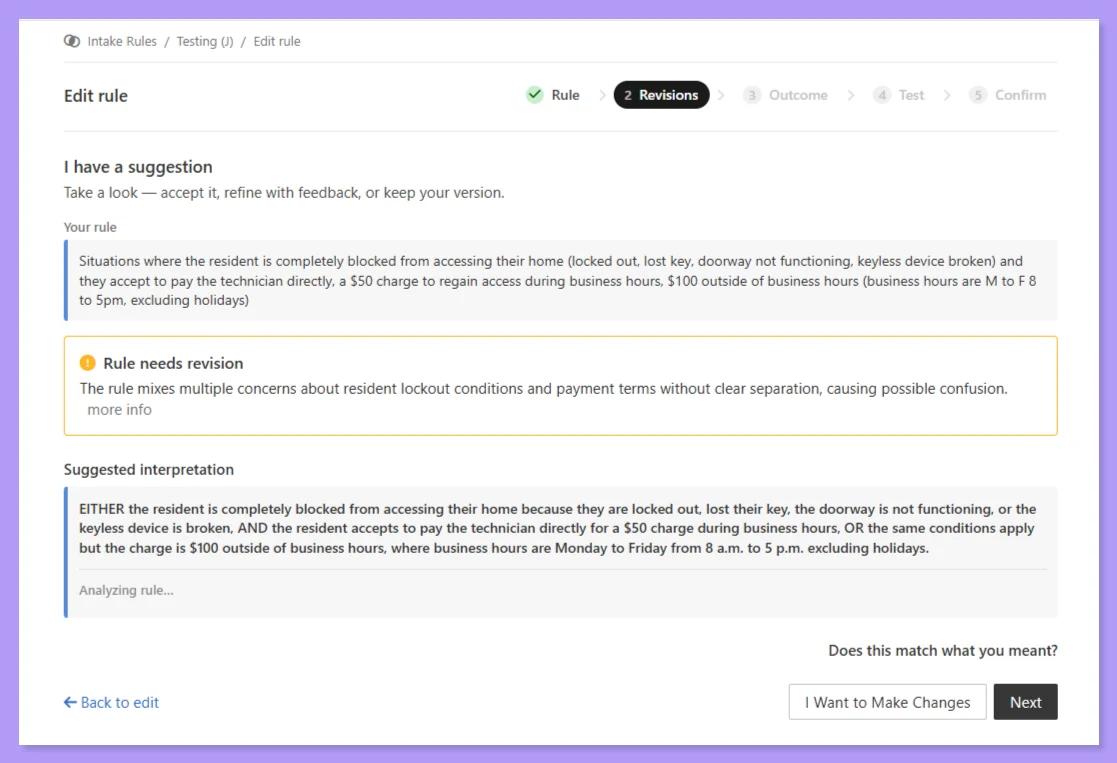
We’ve introduced the Intake Settings Rule Analyzer to help you write rules that your AI intake system can interpret accurately every time. When you add a new rule, the system automatically highlights potential for misinterpretation and suggests clearer wording — then lets you accept the suggestion, request changes, or have a conversation about exactly how you want the rule framed.
This matters because ambiguous phrasing can be read multiple ways by the system that processes intake sessions. The Rule Analyzer catches these edge cases and offers plain-language alternatives before you save.
**How it works:**
You’ll be able to test your rules by simulating a conversation as if you are the resident. Ask questions, provide answers, and see exactly how your rules respond to real-world scenarios — no more guessing whether your intake logic works the way you intended.
**See the full guide here:**
Learn how the Rule Analyzer helps you write clearer, more accurate intake rules—and how to simulate a resident conversation to test them.
2. **Latchel MCP for AI Assistants**
The **Latchel MCP connector** lets you talk to your Latchel account directly from AI assistants like Claude and ChatGPT. Ask in plain English, and the assistant can pull and act on your real work-order data — **no copy-pasting, no switching tabs.**
Everything is scoped to your PM company and gated behind your own Latchel login, so the assistant only ever sees what you're allowed to see.
**What you can do:**
* **Work orders** — list them, get full details (including open tasks), review activity history, and create new ones.
* **Tasks** — list, view details, create, resolve, and reschedule (defer) tasks on a work order.
* **Lookups** — search your properties, see the residents on a property, and browse your company's users and user groups.
A typical request just works conversationally, e.g., **"Open a work order for a leaking faucet at 123 Main St for the current tenant"** or **"What's still open on work order #4821?"**
**Watch this video:**
**Learn how to get started here:**
Learn how to connect Latchel to AI tools giving you instant access to help guides.
### **Resolved Bug**
**Intake Asked Resident for Temperatures**
**What was happening:**
In some intake sessions for HVAC issues, residents were asked to self-report the temperature.
**What's fixed:**
Intake will no longer prompt residents for temperature readings as Latchel’s system references the next 72 hours of weather data by default.
### **Key Ops Process Changes**
**Ask Residents Before Escalating After-Hours**
We updated our emergency work order SOP to close a gap where troubleshooters were escalating to pre-dispatch contacts after-hours without first checking whether the resident was willing to wait until the next business day. The result was unnecessary calls to property managers when residents would have been fine with deferring service dispatch.
**The Key Change:**
After completing troubleshooting, if the issue doesn’t cause property damage or pose an immediate safety risk, troubleshooters should now ask: “Based on what you’ve described, would you be comfortable waiting until \[tomorrow morning / next available time] for a service provider?”
**What this means for you:**
Fewer unnecessary after-hours calls when residents are comfortable deferring service.
### **Industry News**
🏆 We're honored to be recognized by [BestAIFor.com](http://BestAIFor.com)'s 2026 AI Property Management Report as the leading specialist for maintenance triage and coordination.
**Check out the full report here:**
### **Influence Our 2026 Roadmap**
We’re locking our **2026 priorities** soon, and this is your chance to directly **influence what we build next**. It takes less than **60 seconds** — and every response is reviewed by our product and leadership teams!
Your input directly impacts which features get built, improved, or deprioritized — this is where that thought turns into action!
### **Interested in learning more about Latchel's products? Book a meeting with us.**
 This matters because ambiguous phrasing can be read multiple ways by the system that processes intake sessions. The Rule Analyzer catches these edge cases and offers plain-language alternatives before you save.