> ## Documentation Index
> Fetch the complete documentation index at: https://help.latchel.com/llms.txt
> Use this file to discover all available pages before exploring further.
# June 15, 2026
The following are the Latchel updates for the week of June 15, 2026.
### **New Features**
1. **Navigate Latchel with Your Voice**
We've added **Voice Navigation** — a new way to move through your Latchel account without lifting a finger (well, almost). Just tap the new voice icon in the bottom of your screen and speak.
Right now, you can search for:
* Properties
* Work orders
* On-call instances
* Residents
> **Coming Soon:** Search for owners and vendors is up next, with future iterations that let you *take action* entirely by voice — think opening or closing work orders without ever clicking through a menu.
Give it a try and let us know what you think — we'd love your feedback as we keep building this out. Reach out to [success@latchel.com](mailto:success@latchel.com)!
**Want to go even further with AI? Check out Latchel MCP — our connector for AI assistants.**
Learn how to connect Latchel to AI tools giving you instant access to help guides.
Once set up, you can talk to your Latchel account in plain English: pull work order details, check open tasks, look up residents, and more — without switching tabs or copy-pasting anything. Everything is scoped to your account and gated behind your Latchel login.
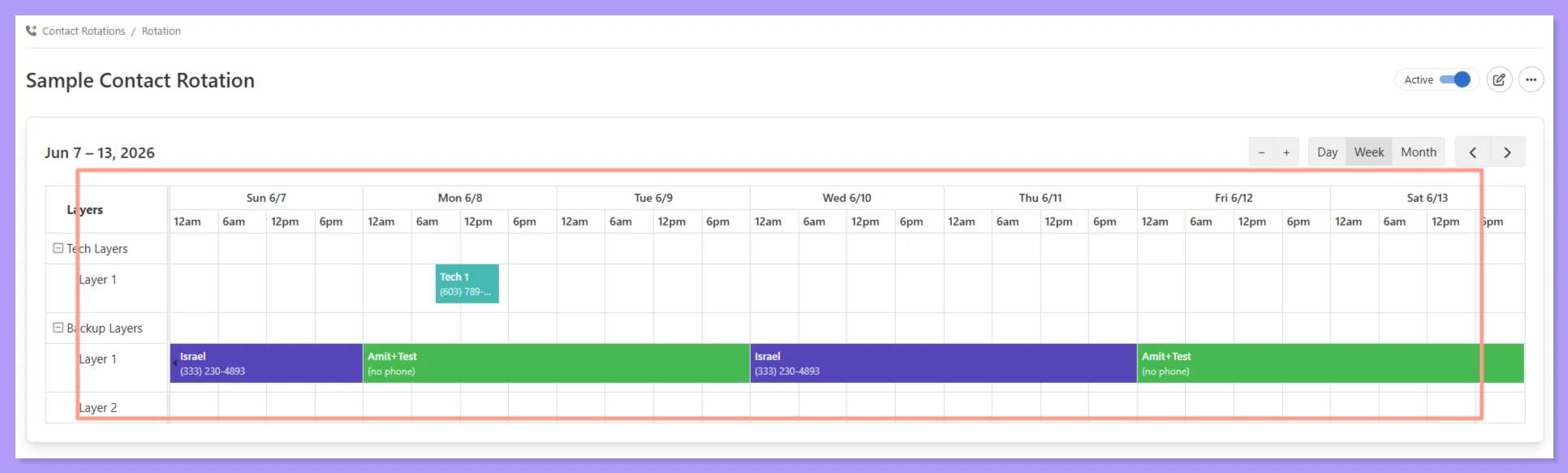
2. **Contact Rotation Schedules — A Smarter Way to Manage Escalation Contacts**
We've introduced **Contact Rotation Schedules** — a dynamic, calendar-based way to manage your emergency escalation contacts and pre-dispatch workflows. If you currently have contact info, time-based instructions, or escalation lists written as freeform text in your account, this is the upgrade worth making.
**What's changing:**
For day-to-day scheduling changes — who's on call, who's covering a shift, who's out this week — you're fully in the driver's seat through the Contact Rotation calendar. But if you have any questions or need assistance, just reach out to [success@latchel.com](mailto:success@latchel.com) and we'll take care of it.
Here's why the rotation-based approach wins:
* **More accurate routing** — No more manual interpretation of time-based notes. Our ops team sees exactly who's available in real time.
* **Flexible coverage** — Supports weekday/weekend splits, after-hours shifts, and complex rotations.
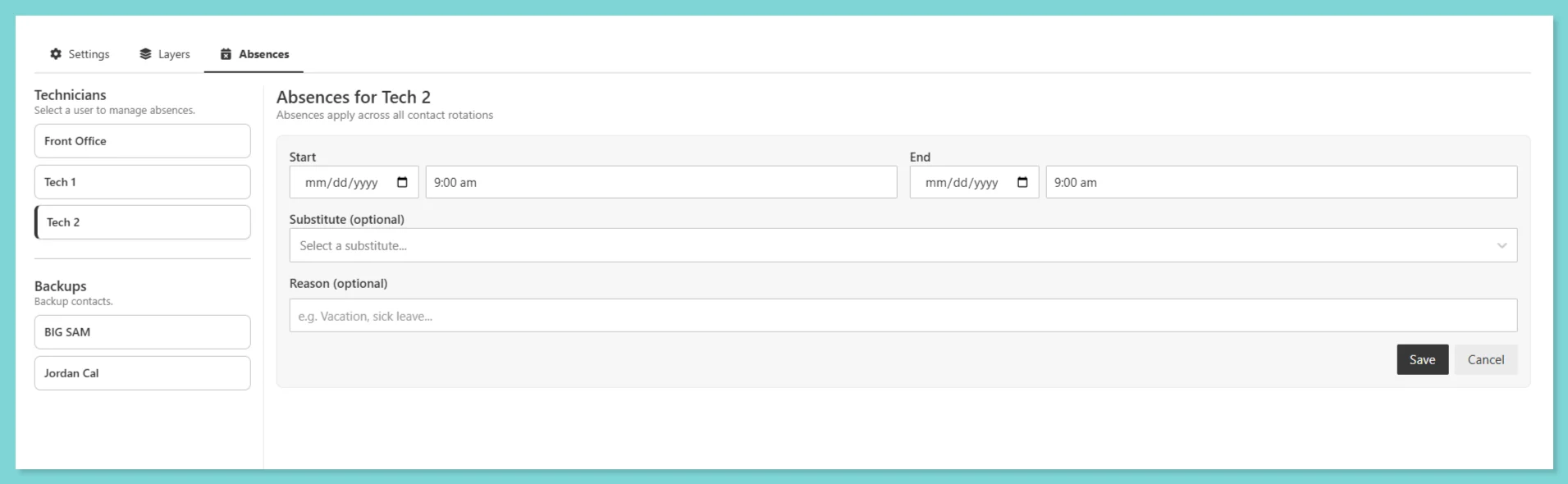
 * **Easy time-off coverage** — Mark someone unavailable and assign a substitute in seconds, no text editing required.
**For more information on setting up absences, please check the help guide below:**
Absences can be scheduled in advance or logged as needed, learn how property managers can manage them anytime through this guide.
* **Easy time-off coverage** — Mark someone unavailable and assign a substitute in seconds, no text editing required.
**For more information on setting up absences, please check the help guide below:**
Absences can be scheduled in advance or logged as needed, learn how property managers can manage them anytime through this guide.
 **Want to know more about Contact Rotation? Read the article below:**
Configure automated alert systems that immediately notify designated technicians or internal team members when specific situations arise.
Ready to make the switch? Reach out to [success@latchel.com](mailto:success@latchel.com) and we'll help you get your rotation set up!
3. **Cleaner Contact Management — Plus a New On-Call Number Setting**
We've refreshed the contact information layout to make managing your team's phone numbers and emails a lot more intuitive.
**What's new!**
* **Clearer primary indicators** — your primary phone and email are clearly marked, and switching them is a single click
* **Per-number capability icons** — each number shows whether it supports calls, texts, or video chat, so there's no guessing (a landline, for example, will show video chat as unavailable)
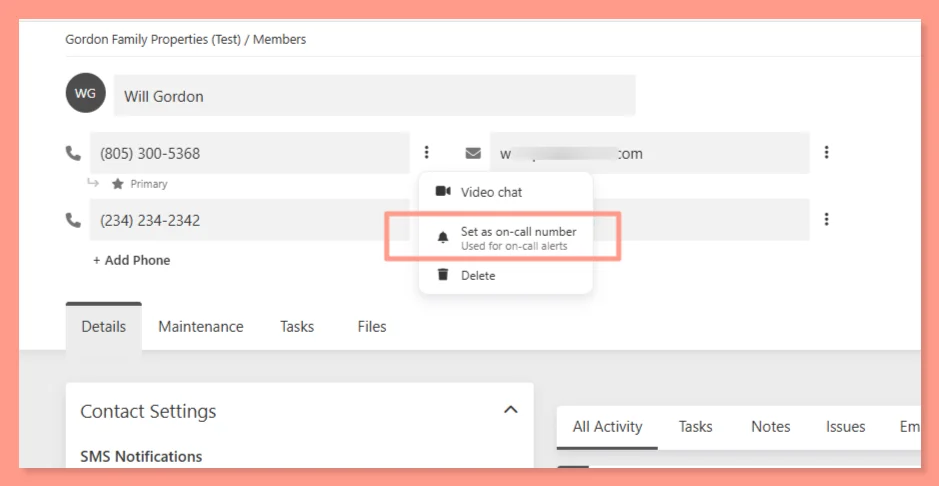
* **On-Call Number setting** — you can now designate a specific phone number as the on-call number for Contact Rotations, separate from your primary. If no on-call number is set, your primary is used by default
**Want to know more about Contact Rotation? Read the article below:**
Configure automated alert systems that immediately notify designated technicians or internal team members when specific situations arise.
Ready to make the switch? Reach out to [success@latchel.com](mailto:success@latchel.com) and we'll help you get your rotation set up!
3. **Cleaner Contact Management — Plus a New On-Call Number Setting**
We've refreshed the contact information layout to make managing your team's phone numbers and emails a lot more intuitive.
**What's new!**
* **Clearer primary indicators** — your primary phone and email are clearly marked, and switching them is a single click
* **Per-number capability icons** — each number shows whether it supports calls, texts, or video chat, so there's no guessing (a landline, for example, will show video chat as unavailable)
* **On-Call Number setting** — you can now designate a specific phone number as the on-call number for Contact Rotations, separate from your primary. If no on-call number is set, your primary is used by default
 No setup required — the updated layout is live in your account now. If you're also setting up a Contact Rotation Schedule for your escalation contacts and/or pre-dispatch instruction, this pairs well with that workflow!
4. **User Groups Are Now Teams — Plus New Team Controls**
We've renamed **User Groups** to **Teams** — a small change that reflects how you already talk about your organization. But the update goes beyond a label refresh.
**Here's what's new:**
* **Team assignment at the work order level** — You can now set a Team directly on a work order, overriding whatever Team would normally be inherited from the property, portfolio, or company level. More flexibility for one-off assignments without changing your broader setup.
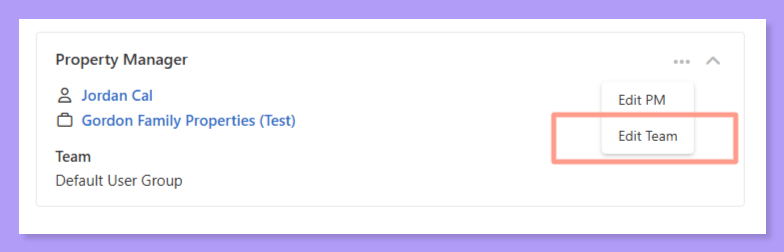
* **Streamlined Work Order Details view** — Team is now found within the **Property Manager card** on the Work Order Details page. The separate Notification Settings card has been retired to keep things cleaner.
* **Filter by Team and Team Member** — On both the Feed and Work Order Kanban views, you can now filter by Team or individual Team Member to quickly zero in on what your crew is working on.
No setup required — the updated layout is live in your account now. If you're also setting up a Contact Rotation Schedule for your escalation contacts and/or pre-dispatch instruction, this pairs well with that workflow!
4. **User Groups Are Now Teams — Plus New Team Controls**
We've renamed **User Groups** to **Teams** — a small change that reflects how you already talk about your organization. But the update goes beyond a label refresh.
**Here's what's new:**
* **Team assignment at the work order level** — You can now set a Team directly on a work order, overriding whatever Team would normally be inherited from the property, portfolio, or company level. More flexibility for one-off assignments without changing your broader setup.
* **Streamlined Work Order Details view** — Team is now found within the **Property Manager card** on the Work Order Details page. The separate Notification Settings card has been retired to keep things cleaner.
* **Filter by Team and Team Member** — On both the Feed and Work Order Kanban views, you can now filter by Team or individual Team Member to quickly zero in on what your crew is working on.
 No action needed — your existing User Groups have automatically carried over as Teams. If you have questions about your setup, reach out to [success@latchel.com](mailto:success@latchel.com)!
### **Resolved Bugs**
1. **Remaining Budget Miscalculation When Invoice + New Estimate Are Both Present**
**What was happening:**
When a vendor uploaded a new estimate on a work order that already had an invoice attached, the system was comparing the new estimate against the original approved budget — without subtracting the invoice already applied. This could cause estimates to be auto-approved even when the actual remaining budget was effectively \$0.
**What's fixed:**
The system now correctly calculates remaining budget as *Approved Budget minus any existing invoice amount* before evaluating new estimates against auto-approval thresholds. Your budget math will stay accurate across multi-phase jobs.
2. **Sync to PMS Showing False Success Message**
**What was happening:**
When triggering a manual "Sync Now" for work orders and on-call alerts, the system would display a success message even when the sync had failed. Refreshing the page would reveal the actual error, leaving you with no reliable signal on whether the sync worked.
**What's fixed:**
The sync status now accurately reflects what actually happened. No more misleading success messages that contradict what you see on refresh.
3. **Work Orders created via API Routing to Wrong PM Assignee**
**What was happening:**
In some cases, when work orders were created via API, they were assigned to an account's default primary user rather than the PM actually overseeing the relevant portfolio — causing misrouted notifications and ownership confusion.
**What's fixed:**
Work orders created via API now correctly route to the PM assigned to the portfolio, regardless of who holds the default primary user role on the account.
### **Influence Our 2026 Roadmap**
We’re locking our **2026 priorities** soon, and this is your chance to directly **influence what we build next**. It takes less than **60 seconds** — and every response is reviewed by our product and leadership teams!
Your input directly impacts which features get built, improved, or deprioritized — this is where that thought turns into action!
### **Interested in learning more about Latchel's products? Book a meeting with us.**
No action needed — your existing User Groups have automatically carried over as Teams. If you have questions about your setup, reach out to [success@latchel.com](mailto:success@latchel.com)!
### **Resolved Bugs**
1. **Remaining Budget Miscalculation When Invoice + New Estimate Are Both Present**
**What was happening:**
When a vendor uploaded a new estimate on a work order that already had an invoice attached, the system was comparing the new estimate against the original approved budget — without subtracting the invoice already applied. This could cause estimates to be auto-approved even when the actual remaining budget was effectively \$0.
**What's fixed:**
The system now correctly calculates remaining budget as *Approved Budget minus any existing invoice amount* before evaluating new estimates against auto-approval thresholds. Your budget math will stay accurate across multi-phase jobs.
2. **Sync to PMS Showing False Success Message**
**What was happening:**
When triggering a manual "Sync Now" for work orders and on-call alerts, the system would display a success message even when the sync had failed. Refreshing the page would reveal the actual error, leaving you with no reliable signal on whether the sync worked.
**What's fixed:**
The sync status now accurately reflects what actually happened. No more misleading success messages that contradict what you see on refresh.
3. **Work Orders created via API Routing to Wrong PM Assignee**
**What was happening:**
In some cases, when work orders were created via API, they were assigned to an account's default primary user rather than the PM actually overseeing the relevant portfolio — causing misrouted notifications and ownership confusion.
**What's fixed:**
Work orders created via API now correctly route to the PM assigned to the portfolio, regardless of who holds the default primary user role on the account.
### **Influence Our 2026 Roadmap**
We’re locking our **2026 priorities** soon, and this is your chance to directly **influence what we build next**. It takes less than **60 seconds** — and every response is reviewed by our product and leadership teams!
Your input directly impacts which features get built, improved, or deprioritized — this is where that thought turns into action!
### **Interested in learning more about Latchel's products? Book a meeting with us.**