> ## Documentation Index
> Fetch the complete documentation index at: https://help.latchel.com/llms.txt
> Use this file to discover all available pages before exploring further.
# March 23, 2026
The following are the Latchel updates for the week of March 23, 2026.
### **New Features**
**Smarter Intake for On-Call Alerts + What’s Next**
We’ve made an update to **Intake** to create a faster, more seamless experience for both residents and your team—especially when urgent issues arise.
**What's New:**
**On-Call Alerts have fewer intake questions for residents.**
**Why This Matters:**
1. **Faster, smoother resident experience**
When a request will result in your on-call team member being immediately notified, we remove unnecessary questions so residents can submit requests quickly and get help faster.
This is especially helpful for **non-maintenance emergencies** handled through **Latchel On-Call**, including:
* Noise complaints
* Smoking violations
* Security concerns
* On-site safety or management issues
2. **A step toward Generic Intake (Coming Soon)**
This update is part of a larger evolution of Intake. We’re actively building **Generic Intake and an AI-powered phone intake system**, which will allow Latchel to:
* Intake and route non-maintenance requests
* Handle scenarios such as:
* Leasing questions
* Owner inquiries (e.g., hiring a property manager)
* General property-related requests
Since these requests don’t require scheduling, this change ensures Intake is aligned with what’s coming next.
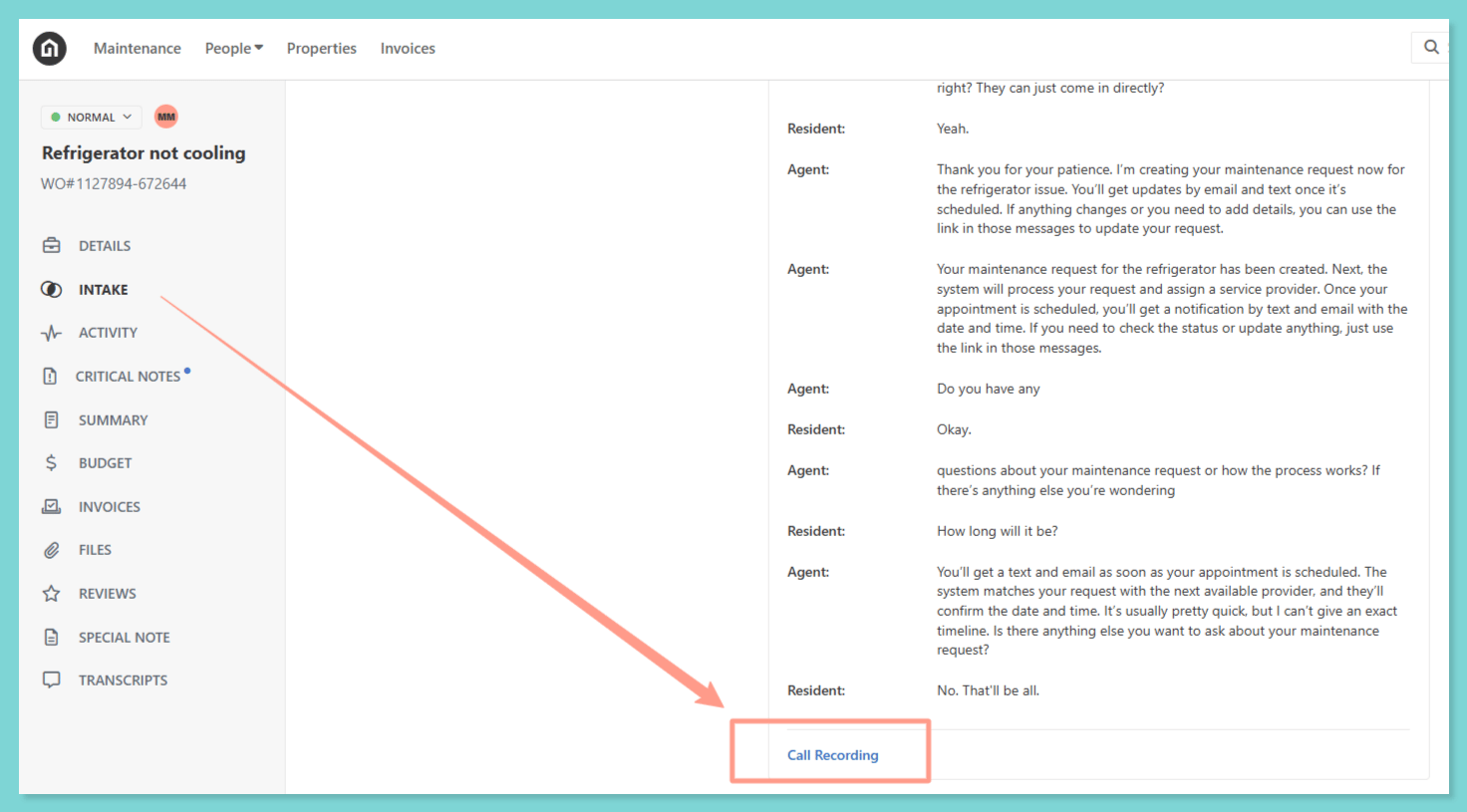
**New:** For work orders and On-Call alerts created through our **AI-powered phone intake system**, **call recordings are now available** directly within the work order!
 **What’s Next: Early Access Opportunity**
We’re looking for customers interested in helping shape **Generic Intake**.
### **Resolved Bugs**
**Invoice Email Link Redirect Error**
Some property managers experienced an issue when clicking **“Review Invoice”** from invoice notification emails redirected to a **“Not Found”** error page.
We identified and resolved the issue, and invoice links now correctly direct users to the associated invoice!
### **Key Ops Process Changes**
**Budget Handling for Work Orders**
We’ve introduced updates to how budget-related scenarios are handled to ensure faster dispatch, fewer delays, and clearer communication with your team.
We’ve standardized how work orders are handled when:
* A **hard budget limit** is set to \$1.
* The **approved estimate amount does not match the hard budget limit** on the work order.
**What to Expect:**
**If a \$1 budget is set:**
Our team will still attempt to dispatch the work order. However, most service providers will be unable to accept work under a \$1 NTE.
**If no provider can accept due to budget constraints:**
* For emergency issues, we will attempt to contact your emergency escalation contact.
* If we’re unable to reach them, or for non-emergency issues, we will follow up with your team for next steps.
**What this means for you:**
Review your **budget limit settings** and ensure approved amounts match the work order budget. Setting realistic budgets helps us dispatch faster and avoid delays in resolving issues.
**To know more about budget limit settings, please visit:**
Adjust the budget threshold that triggers approval requirement on work orders.
### **Influence Our 2026 Roadmap**
We’re locking our **2026 priorities** soon, and this is your chance to directly **influence what we build next**. It takes less than **60 seconds** — and every response is reviewed by our product and leadership teams!
Your input directly impacts which features get built, improved, or deprioritized — this is where that thought turns into action!
### **Interested in learning more about Latchel's products? Book a meeting with us.**
**What’s Next: Early Access Opportunity**
We’re looking for customers interested in helping shape **Generic Intake**.
### **Resolved Bugs**
**Invoice Email Link Redirect Error**
Some property managers experienced an issue when clicking **“Review Invoice”** from invoice notification emails redirected to a **“Not Found”** error page.
We identified and resolved the issue, and invoice links now correctly direct users to the associated invoice!
### **Key Ops Process Changes**
**Budget Handling for Work Orders**
We’ve introduced updates to how budget-related scenarios are handled to ensure faster dispatch, fewer delays, and clearer communication with your team.
We’ve standardized how work orders are handled when:
* A **hard budget limit** is set to \$1.
* The **approved estimate amount does not match the hard budget limit** on the work order.
**What to Expect:**
**If a \$1 budget is set:**
Our team will still attempt to dispatch the work order. However, most service providers will be unable to accept work under a \$1 NTE.
**If no provider can accept due to budget constraints:**
* For emergency issues, we will attempt to contact your emergency escalation contact.
* If we’re unable to reach them, or for non-emergency issues, we will follow up with your team for next steps.
**What this means for you:**
Review your **budget limit settings** and ensure approved amounts match the work order budget. Setting realistic budgets helps us dispatch faster and avoid delays in resolving issues.
**To know more about budget limit settings, please visit:**
Adjust the budget threshold that triggers approval requirement on work orders.
### **Influence Our 2026 Roadmap**
We’re locking our **2026 priorities** soon, and this is your chance to directly **influence what we build next**. It takes less than **60 seconds** — and every response is reviewed by our product and leadership teams!
Your input directly impacts which features get built, improved, or deprioritized — this is where that thought turns into action!
### **Interested in learning more about Latchel's products? Book a meeting with us.**