New Features

  1. Upgraded Analytics Dashboard
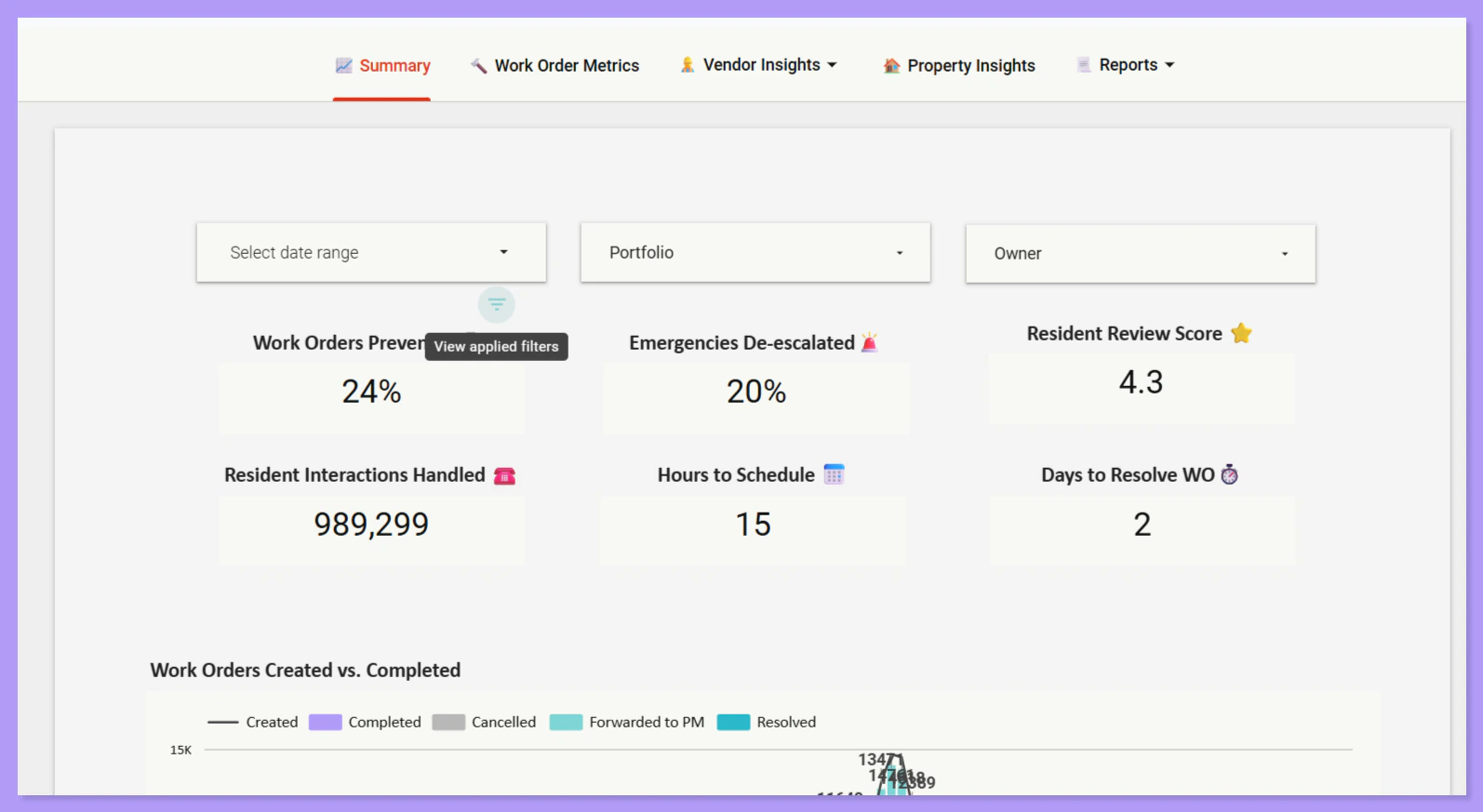
We’ve refreshed the Latchel Analytics experience to give you clearer insights and a smoother reporting workflow—all directly within the platform. The new experience is now live and available at:

Analytics

What’s New:
  • A redesigned dashboard with high-level summaries and detailed views across: Work Orders, Residents, Properties, and Invoices
  • Flexible filtering by custom date ranges, portfolios, and owners
  • Faster access to the data you need, all in one place
Important notes to get started:
  • To view Analytics, you must be logged into a Google account using the same email address you use for Latchel.
  • This does not need to be a Gmail address—Google allows accounts with any email domain.
Screenshot2026 01 26072612
To export a report, click the 3 dots on the right and select Export to CSV or Google Sheets.
We’re excited to bring Analytics fully in-house and will continue improving reporting and export functionality based on your feedback.
  1. Faster Work Order Updates — Comments No Longer Required
We’ve made it easier (and faster) to manage work orders. Property Managers are no longer required to add a comment when changing a job status or merging work orders! Comments are still available when you need them—but now they’re optional, giving you more control and saving time on everyday actions. This update removes unnecessary friction and supports a more streamlined, inbox-style workflow, allowing you to move quickly through approvals and job updates without extra steps.

Resolved Bugs

  1. Punch List Formatting in Work Orders
We’ve resolved an issue that could cause confusion when submitting multiple items within a single work order.
What was happening?When Property Managers entered a punch list with line breaks or bullet points, Service Providers sometimes received the details as a single paragraph instead of a clearly separated list. This made it easier for individual items to be overlooked.
What’s fixed:Line breaks and item separation are now properly preserved when work order details are shared with Service Providers, ensuring each task is clearly visible and easier to complete accurately.
  1. Service Provider Morning SMS Reminders
We’ve resolved an issue affecting morning SMS reminders sent to Service Providers.
What was happening?Some Service Providers were not receiving their daily text message reminder showing how many open work orders they had in their queue. While other SMS notifications were sending successfully, this specific reminder was not being delivered—causing providers to miss a key daily prompt.
What’s fixed:Morning SMS reminders are now sending correctly, ensuring Service Providers receive a daily overview of their open work orders as expected.

Key Process Changes

Improved Emergency Outreach to Preferred Service Providers We’ve increased the number of call attempts to your Preferred Service Providers for emergency work orders. We aim to reach your preferred vendors before escalating the issue to your team—reducing unnecessary handoffs and improving confidence in emergency response.
What’s changing:
  • We make multiple call attempts across all listed preferred providers, ensuring each has a fair chance to accept the job
  • A second follow-up attempt is completed if none of your preferred providers respond initially
  • Only after these attempts are completed do we proceed with the existing escalation path
What this means for you:
  • Preferred vendors are given more opportunity to respond
  • Fewer avoidable escalations back to Property Managers
  • Greater confidence that we didn’t “give up too early” during emergencies
  • No added action required from you
If no preferred provider can be secured after these outreach attempts, we’ll continue following your existing settings—either assigning a Latchel Network Service Provider (if opted in) or escalating per your preferences. This update is already live and applies to all emergency work orders.

Special Announcements

New! Recurring Work Orders Now Include Common Area Property Setup The wait is over! The Recurring Work Orders Program is now officially open! How to Get Started:
  • Submit the Recurring Work Order Form once by accessing the link below. Select your desired frequency, and complete your recurring maintenance schedule.
  • If the work applies to an entire building or a common area (e.g., hallways, landscaping), simply select the appropriate options in the form. You can also request that we create the common area property for you. If the work is for a single unit, you can skip the common area section.
  • To edit, pause, or cancel an existing Recurring work order, please use the form below:
For questions, contact opsintegrations@latchel.com.

Influence Our 2026 Roadmap

We’re locking our 2026 priorities soon, and this is your chance to directly influence what we build next. It takes less than 60 seconds — and every response is reviewed by our product and leadership teams! Bonus: By completing the form and leaving your email address, you’ll be entered into a drawing to win a $25 Amazon gift card. Your input directly impacts which features get built, improved, or deprioritized — this is where that thought turns into action!

Interested in learning more about Latchel’s products? Book a meeting with us.