
What is Outbound Voice?
Latchel has always answered the phone for you. Now it can pick it up on your behalf, too. Outbound Voice is Latchel’s newest AI Voice capability, and it flips the maintenance coordination script: instead of your team calling vendors to ask “did you make it out there?” or “when’s the invoice coming?”, Latchel’s AI voice agent makes that call for you — with full context on the work order, the vendor’s history, and what still needs to happen. There are two ways to put it to work:Click-to-Call
Automated Daily Calls
How It Works
The AI agent takes the same actions a vendor could take themselves in their Latchel portal — confirming or rescheduling an appointment, collecting an invoice, checking on a job’s status — and it has full context going in:- Every active work order assigned to that vendor
- Any prior calls or texts about those jobs, so it doesn’t ask the vendor to repeat themselves
- Whether a call is even worth making that day — if there’s nothing new to discuss, no call goes out
Work Order States and Ages That Trigger Calls
States
- Accept open (unaccepted) requests
- Scheduling Service Provider - schedule accepted work orders
- Confirming Completion - Confirm completion of scheduled work
- Awaiting Invoice - Upload/submit invoice for completed work
Age Thresholds
- Under 12 hours since last state change → no call
- 12 hours to 3 days since last state change → triggers the daily automated outbound call; while the vendor is on the line, the AI will also ask about any other open WOs whose last state change was within the past month
- Needs Approval status does NOT trigger a call (it doesn’t require vendor action)
Steps to Activate
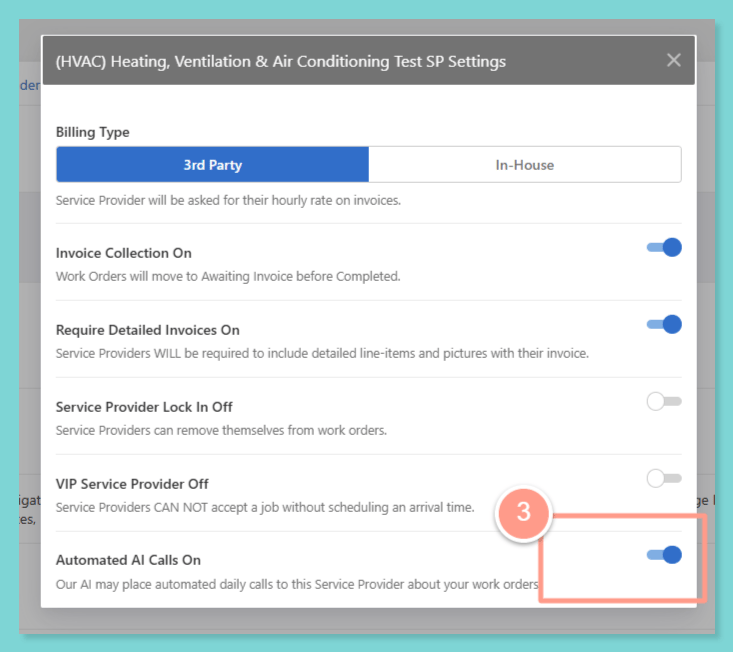
1. Turn On Automated AI Calls
Go to My Service Provider Management to turn on Automated AI Calls
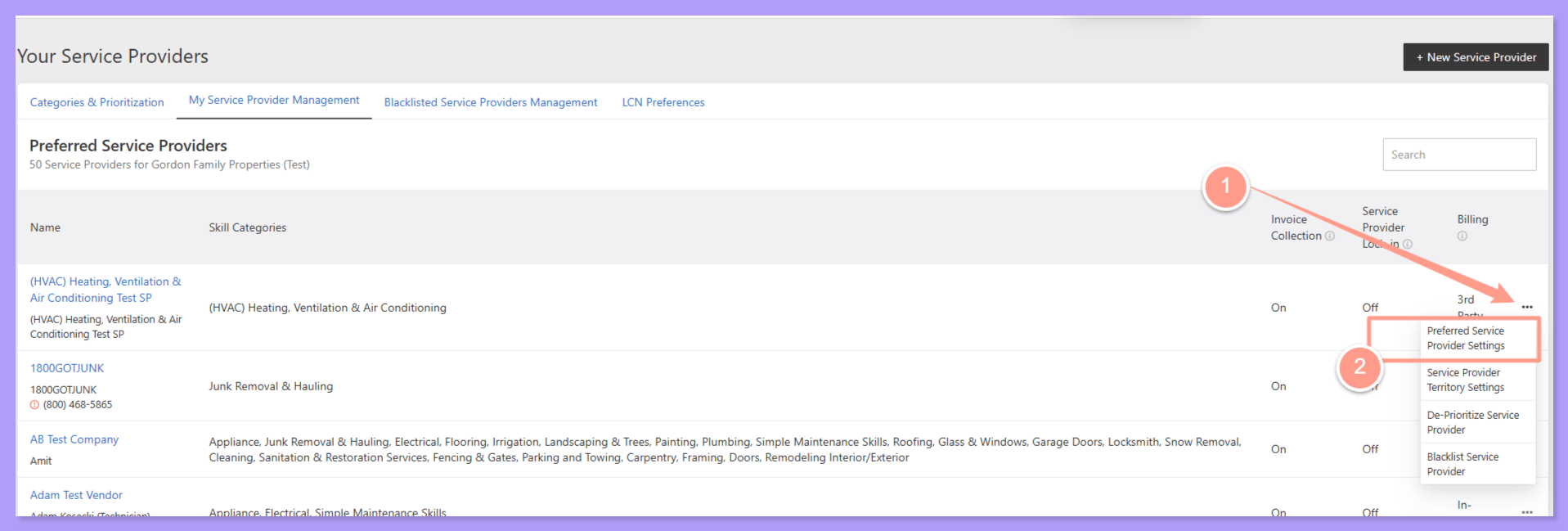
Toggle the switch to on.
2. Call Service Provider via AI
Open any work order with an assigned vendor.
Look for the call button
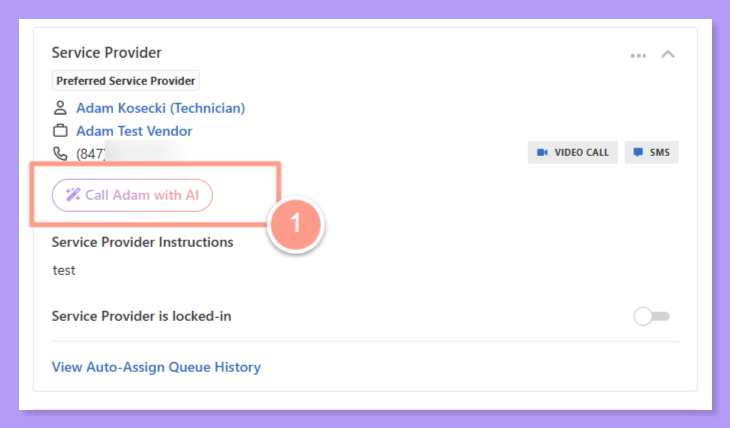
Click it, and go about your day
3. Automated Daily Calls
Go to your Account Settings
Sign in to your Latchel Account
Turn on Automated Outbound Calls
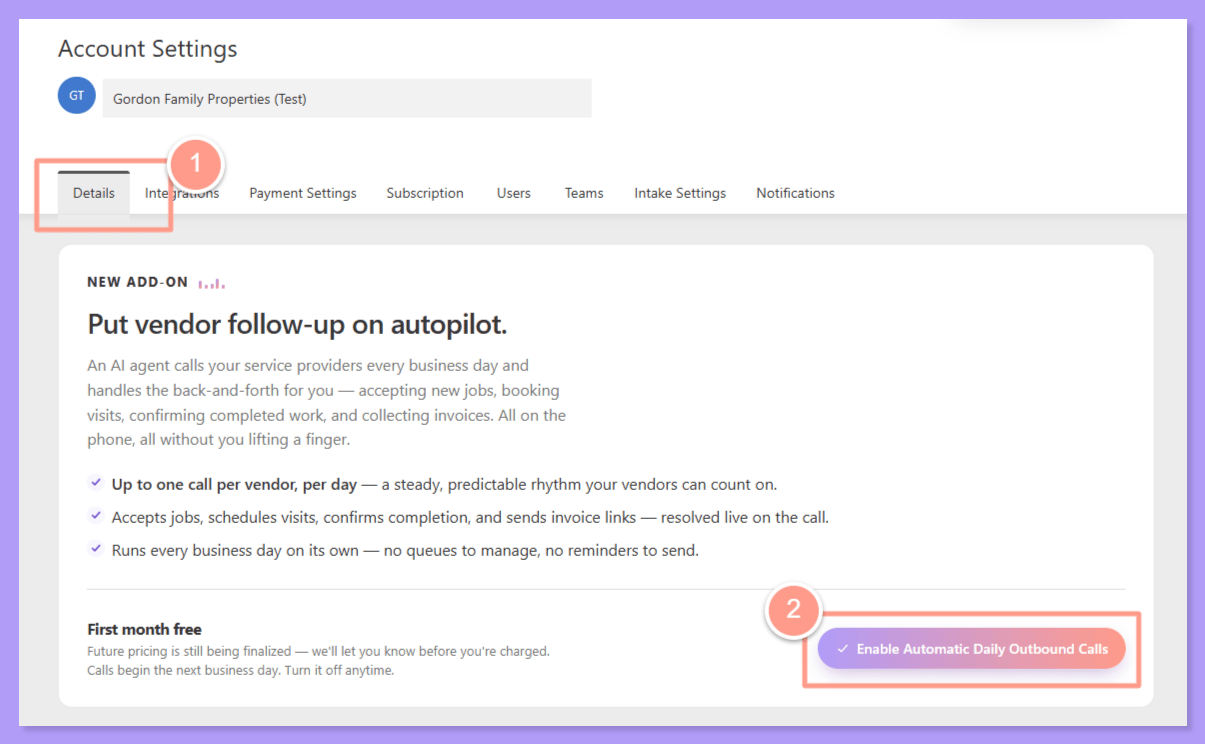
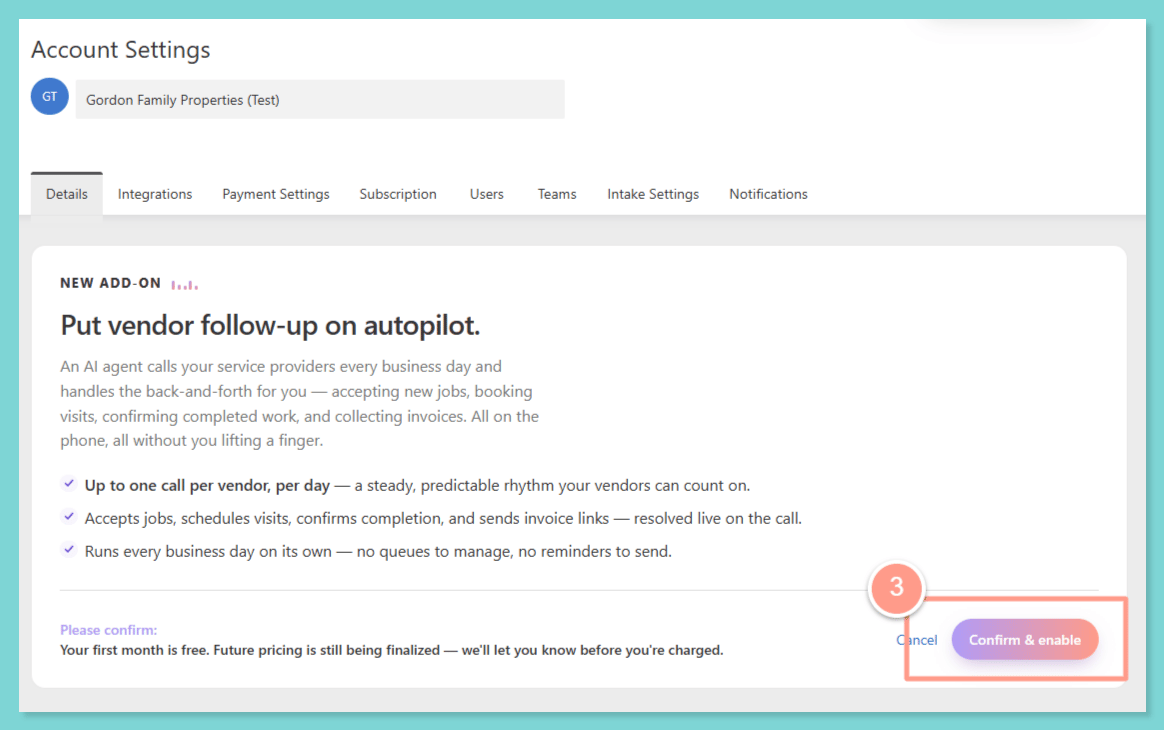
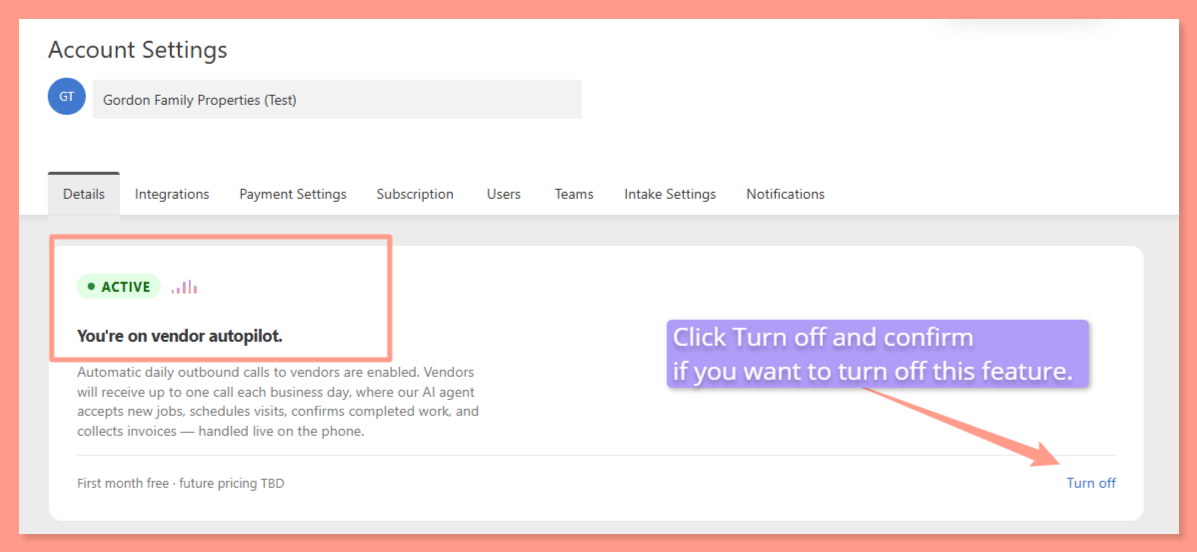
Give it one business day
Fine-tune which vendors get called (optional)
Requirements & Eligibility
Vendor Opt-Outs & Preferred Call Times
There are three ways to manage this: PM manages it on the vendor user profile Vendor self-manages by accessing their Call Preferences in their Account Settings. Vendor states their preferences during a call Not a Latchel customer yet? You can request a live demo of Outbound Voice and the rest of the AI Voice suite:Request a Demo
Frequently Asked Questions
What's the difference between Click-to-Call and Automated Daily Calls?
What's the difference between Click-to-Call and Automated Daily Calls?
If I turn on Automated Daily Calls, does every vendor get called every day?
If I turn on Automated Daily Calls, does every vendor get called every day?
Can I exclude specific vendors from automated calling?
Can I exclude specific vendors from automated calling?
Can vendors choose what time they get called?
Can vendors choose what time they get called?
Does the AI know if a vendor already has other jobs scheduled that day?
Does the AI know if a vendor already has other jobs scheduled that day?
What happens if the AI can't resolve something on the call?
What happens if the AI can't resolve something on the call?
Does this work in Spanish?
Does this work in Spanish?
Can I see what was said on the call?
Can I see what was said on the call?
Is there a limit to how many times a vendor can reschedule before Latchel escalates?
Is there a limit to how many times a vendor can reschedule before Latchel escalates?
What if a vendor is already headed to a property and a new compatible job comes in?
What if a vendor is already headed to a property and a new compatible job comes in?
What happens if the vendor doesn't answer, or it goes to voicemail?
What happens if the vendor doesn't answer, or it goes to voicemail?
Can I see why a specific work order wasn't brought up on a given day's automated call?
Can I see why a specific work order wasn't brought up on a given day's automated call?
Does AI Voice only make outbound calls, or can it also answer when a vendor calls in?
Does AI Voice only make outbound calls, or can it also answer when a vendor calls in?
When the AI collects an invoice on a call, how is it delivered to us? We route invoices into our accounting system and need to know where they land.
When the AI collects an invoice on a call, how is it delivered to us? We route invoices into our accounting system and need to know where they land.
Does the autopilot only call on dispatched and approved work orders? We need confirmation it will not schedule work sitting in Needs Approval or estimate-only status.
Does the autopilot only call on dispatched and approved work orders? We need confirmation it will not schedule work sitting in Needs Approval or estimate-only status.
We are in California, a two-party consent state. Please confirm how recording consent is handled on these calls beyond the opening disclosure.
We are in California, a two-party consent state. Please confirm how recording consent is handled on these calls beyond the opening disclosure.