
White labeling is set at the Portfolio level. It only changes what residents see for the properties in that portfolio.
In other words:Turn on white labeling for a portfolio, and residents there see the community name instead of property manager or Latchel branding.
What This Feature Does
When white labeling is on for a portfolio, the community name replaces property manager and Latchel branding on:- The resident dashboard
- On-call alert public pages
- On-call notifications, by email and SMS
How to Turn On White Labeling for a Portfolio
Open the portfolio.
Click Places, select Portfolios, and open the portfolio you want to white label. Need a refresher? See our guide below.
Managing Your Portfolios
Organize properties into portfolios and streamline team or notification settings by group.
Turn on white labeling.
In the portfolio’s Portal Settings, turn on White Label, then save your changes.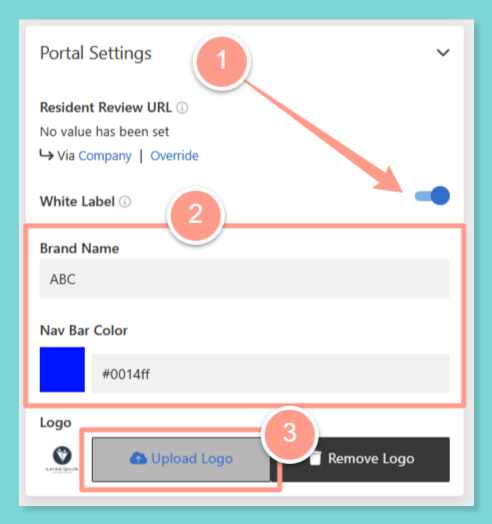
Things to Remember
Frequently Asked Questions
Does this change every portfolio?
Does this change every portfolio?
No. White labeling only applies to the portfolio where you turn it on.
Will residents still see Latchel in work order texts?
Will residents still see Latchel in work order texts?
For now, yes. Work order messages can still mention your company or Latchel.
Configuring Portal Settings
Manage settings that customize your team’s experience in the Latchel portal.