
Next Live Webinar: From Answering Everything to Working EverywhereJoin us Tuesday, November 10, 2026 at 10:00 am PT / 1:00 pm ET for our next live webinar session.
Save your seat!
New Features
- Conversations Is Live for All Customers — Plus a New AI Assistant Tab
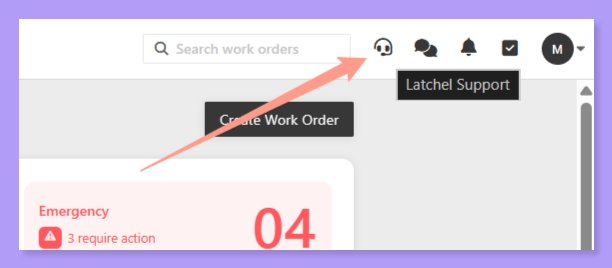
- A new home for your messages: Next to the bell in the top-right nav you’ll find the Conversations icon, where every resident and vendor conversation now lives. The old SMS icon is now a chat-with-support icon that goes straight to our team.
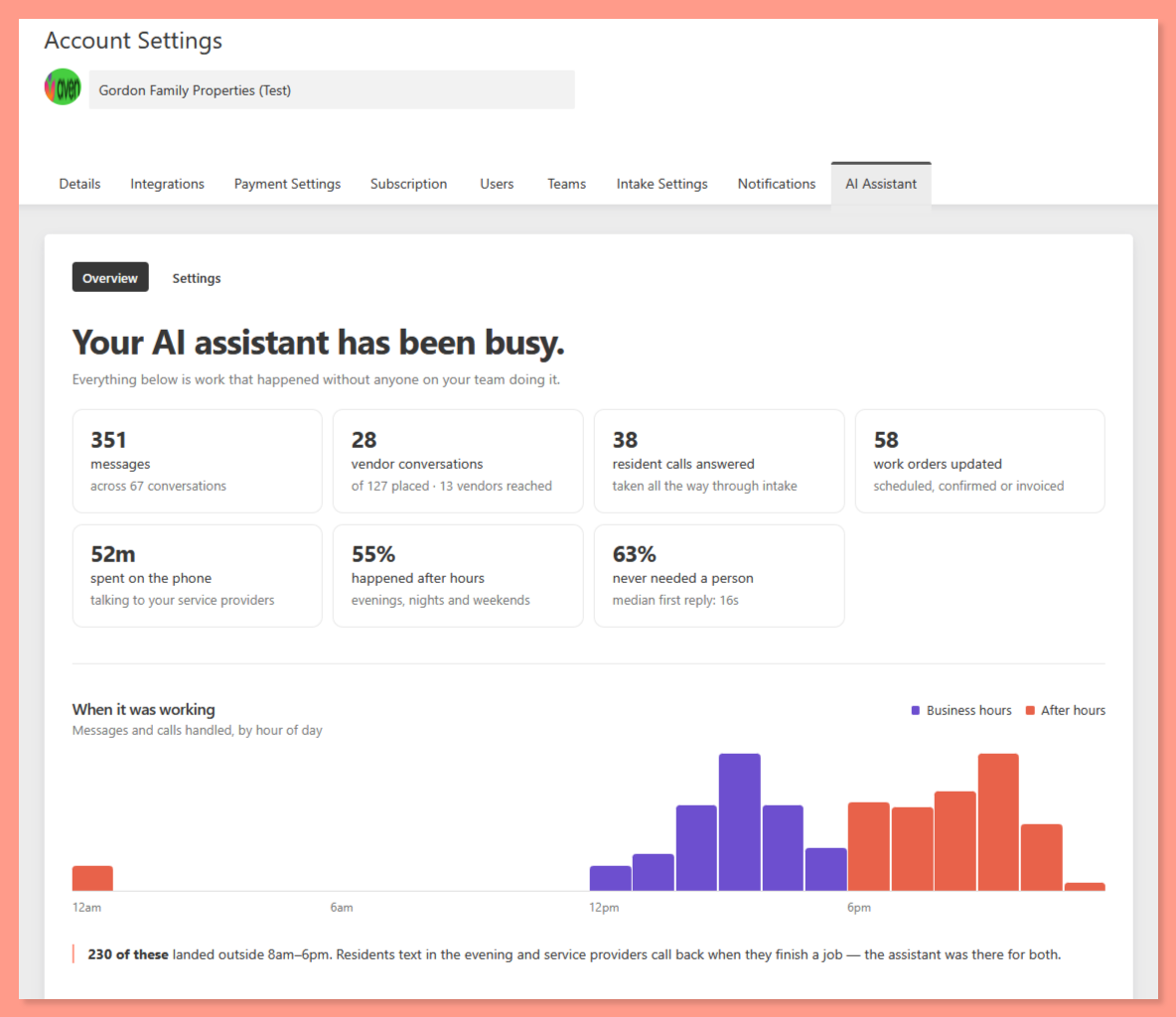
- The AI Assistant tab: Want to see what your AI assistant has been doing for you? Go to Account Settings → AI Assistant, or click See everything from your feed. You’ll see messages handled, vendor conversations, time on the phone, and how much happened after hours vs. business hours, so you can see what you didn’t have to be bothered with.
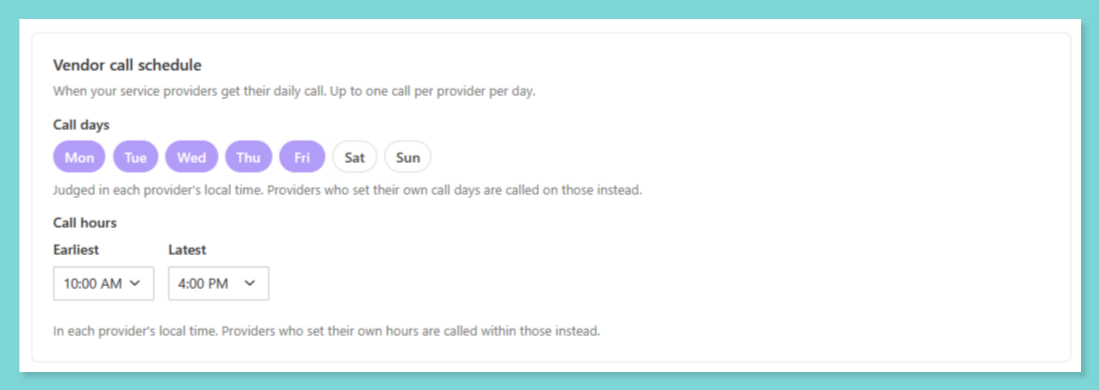
- Your vendor call schedule: Also in the AI Assistant tab → Settings, choose which days your vendors get automated calls (Tuesdays and Thursdays only, for example) and narrow the call hours (say 10–4 instead of 10–7). Vendors still set their own time windows, and you can see which ones have.
AI features are on by default for Autopilot customers as we roll out Autopilot AI. If you’d rather opt out, reach out to success@latchel.com.
AI Messaging: How Conversations Work
Learn how Latchel’s AI handles resident and service provider messages.
AI Assistant Tab
See what your AI assistant handled and set your vendor call schedule.
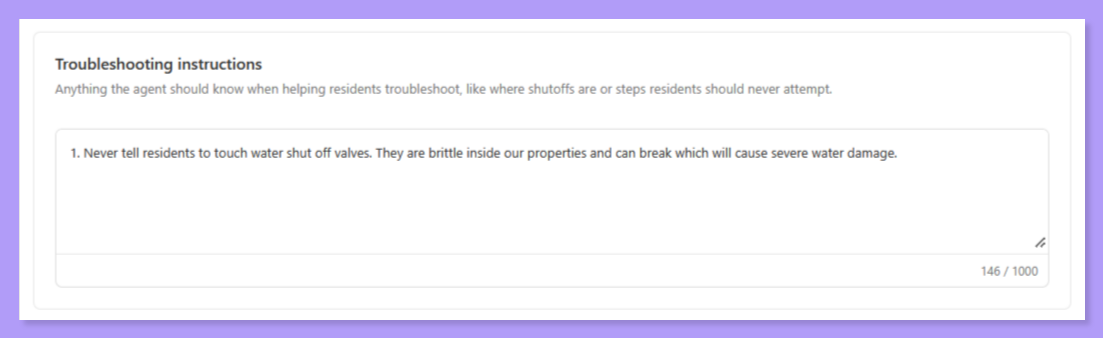
- Tell Our AI How You Want Troubleshooting Done (Beta)
Conversation Settings
Customize how Latchel’s AI talks with residents during intake.
- Meet Latchel for Slack
- Ask about a work order in the thread: tag @Latchel and get the status, vendor, appointment and resident without repeating the address
- Turn a conversation into a work order: “@Latchel create a work order for this” fills in the property, resident and issue from the thread
- Approve estimates, schedule work and message residents or vendors without leaving Slack
- See what needs you:
/latchel agendaprivately lists the approvals, conversations and tasks waiting on you
Slack commands are included with all Latchel subscriptions. Conversational AI features are available exclusively for Autopilot AI customers.
Add Latchel to Slack
- Techs Can Now Call Residents Without Sharing Their Number
- Numbers stay private: the resident sees your Latchel-assigned number, the same one they already use for maintenance. The tech’s own phone number is no longer shown to the resident.
- Two-party consent: all parties are aware calls are being recorded at all times.
- Everything is documented: each call is logged and all calls are recorded. Transcriptions and automatic work order updates based on the call are coming soon.
The button stays available for 72 hours after the alert is accepted.
- White Label by Community
Account Settings Overview: Portal Settings
Customize what residents see in their portal.
- Your Call History, Now in the Public API
API Docs
Explore the Latchel Public API.
Resolved Bugs
- Fewer Unnecessary Escalations From AI Messaging
What’s fixed:AI Messaging now only escalates to you when a request is outside its scope, or when someone asks for a person on a work order you manage. Messages that were escalated by mistake have been de-escalated.
Shoutout!
Shoutout!
Shoutout to Real Property Management Colorado for flagging it!
- Attach Photos and Files Anytime in Conversations
What’s fixed:Look for the paperclip. Residents, property managers and our team can now attach photos and files at any point in a conversation.
Shoutout!
Shoutout!
Shoutout to Rental Zebra for the request!
- Non-Emergency Work Orders Route Correctly for Emergency-Only Plans
What’s fixed:Non-emergency work orders are forwarded to you again, as they should be, and any changes you make to a work order right after creating it are still respected.
- Automated Calls Now Reach Vendors With U.S. Territory Phone Numbers
What’s fixed:These numbers are now handled correctly, so these vendors get automated calls just like everyone else.
- Daily Vendor Reminders Now Focus on Current Work
What’s fixed:Daily reminders, text replies and AI chats now all work from the same list: open work orders with activity in the last 30 days. Vendors hear about the jobs that matter now, and the AI always knows which job they mean.
Key Ops Process Changes
- Finding the Source of Leaks From Neighboring Units
- When a resident reports a leak from a neighboring unit, our team now asks which unit it’s coming from
- If that unit is in your portfolio, we call that resident once and ask them to check for a leak and turn off the water, then continue troubleshooting or dispatching
- If we can’t identify or reach the neighboring unit, we escalate to you with a clear request for the information we need
What this means for you:
- Fewer leak escalations that you have to sort out yourself
- No added action required from you
- Stopping the water sooner means less damage
- Neither resident’s details are ever shared with the other
- A Clear Plan When Flooding Can’t Be Stopped
What this means for you:We’ll escalate to you right away, as we do with every 911 situation, so you know what’s happening and what to do next.Why this matters:Uncontrolled water is one of the fastest ways a maintenance issue becomes major property damage. This makes sure the water gets stopped even when no plumber can respond.
Special Announcements
- Live Webinar: From Answering Everything to Working Everywhere
- The new Latchel App for iOS and Android
- Latchel for Slack and Microsoft Teams
- The upgraded Latchel MCP, which connects your AI tools to Latchel and your other systems
- A first look at private conversations that update work orders for you
- Live Q&A, plus how to get early access
Bonus!Register for a chance to win a free month of Autopilot AI! You’ll get extra entries for attending live and for every colleague you refer, and two winners will be picked. Can’t make it? Register anyway, and we’ll email you the recording.
Save Your Seat!
- Save These Numbers So Your Team Never Misses an Emergency
- Your Latchel-assigned number: work order updates, messages and replies. It’s the same number your residents call for maintenance.
- 206-900-9466: emergency job offers
- 978-848-4371: Latchel On-Call alerts, if your team uses On-Call
How to View Your Latchel-Assigned Phone Number
Learn where to find the phone number assigned to your Latchel Account.